Plotting and appearance

This notebook illustrates plotting options using one real fMRI fit and several synthetic examples. It covers the BrainNet Viewer-style 3D network renderer (htfa.plot_network, htfa.brainnet), time-course ribbons (htfa.plot_timecourse), and matplotlib / nilearn plots on HTFAResults. The real dataset supplies example coordinates and connections; these appearance controls apply to other supported datasets and experimental tasks as well.
The network examples use correlations between fitted factor time courses. Static connectivity measures those relationships within a participant; inter-subject functional correlation (ISFC) relates one participant’s time courses to those of the other participants at corresponding movie times. These are example edge values for the renderer, not requirements of every plotting function.
Data used in each section.
Sections 1 to 10 (3D network renderer, BrainNet option file, side-by-side panels): a real HTFA fit on six adults from nilearn’s
development_fmridataset. Participants watch the short animated film Partly Cloudy while 168 brain volumes are acquired 2 seconds apart (TR). Section 1 describes the selected fit.Section 11 (time courses): synthetic subject-by-time curves made with a seeded random generator, except the last pair of panels, which uses real sliding-window connectivity from the same fit.
Section 12 (
plot_nodes,plot_connectivityon 3D data): the same real fit.Section 13 (
plot_nodes,plot_connectivity,plot_reconstructionon 2D data): synthetic images fromhtfa.make_tfa_data.Section 14 (nodes drawn inside the brain,
snap): the same real fit.Section 15 (animation options): the same real fit.
The first run of the notebook downloads the dataset (nilearn) and the brain meshes (NITRC, see htfa.brainnet.fetch_mesh) and, by default, a saved copy of the HTFA fit (section 1); later runs reuse the downloaded files.
[1]:
# Install htfa if it is missing (for example on Colab); other packages
# install themselves the first time they are needed.
try:
    import htfa  # noqa: F401
except ImportError:
    %pip install -q htfa
[2]:
import base64
import json
import os
import tempfile
import time
import warnings
from pathlib import Path

import numpy as np
import scipy.io
from IPython.display import HTML, display
from sklearn.exceptions import ConvergenceWarning

import htfa
from htfa import brainnet, timecourse

plt = htfa.require("matplotlib.pyplot")
Image = htfa.require("PIL.Image")
ImageChops = htfa.require("PIL.ImageChops")
warnings.filterwarnings("ignore", message="A worker stopped")

CACHE = Path.home() / ".cache" / "htfa" / "tutorials" / "11"
CACHE.mkdir(parents=True, exist_ok=True)
1. Data and fit
The first six adults are downloaded and preprocessed by htfa.datasets.fetch_development_fmri (MNI152 brain mask, voxels outside the subject’s brain dropped, linear detrend plus confound regression per run), and HTFA is fitted with K=30, init='ncorr' and the subsampling described in docs/performance.rst (max_voxels=5000, max_trs=168). The fit is deliberately short (6 global iterations); it is meant to give realistic inputs for the plots, not a converged template.
By default (REFIT = False) the next cell downloads a saved copy of this fit with htfa.datasets.fetch_tutorial_fit from the tutorial-data-v1 data release of the htfa repository, checks its SHA-256 and loads it with np.load(..., allow_pickle=False); the printed lines describe the fitting settings. REFIT = True fits HTFA from scratch instead, with one parallel job per CPU (n_jobs=os.cpu_count()); that result is not cached.
[3]:
# Fit from scratch (True), or download the saved fit made with these settings
# (False, the default; 0.2 MB).
REFIT = False
NAME = "development_fmri_6adults_K30"

settings = dict(
    K=30,
    max_global_iter=6,
    max_local_iter=5,
    max_voxels=5000,
    max_trs=168,
    init="ncorr",
    random_state=0,
)
ds = htfa.datasets.fetch_development_fmri(n_subjects=6)
Xs, Rs = ds.data, ds.coords
if REFIT:
    t0 = time.perf_counter()
    with warnings.catch_warnings():
        warnings.simplefilter("ignore", ConvergenceWarning)
        res = htfa.fit(Xs, coords=Rs, **settings, n_jobs=os.cpu_count())
    fit_seconds = time.perf_counter() - t0
else:
    fit = htfa.datasets.fetch_tutorial_fit(NAME)
    saved = json.loads(str(fit["settings"]))
    assert {k: saved[k] for k in settings} == settings, saved
    assert list(fit["subject_ids"]) == ds.subject_ids, fit["subject_ids"]
    print(f"saved fit: htfa.datasets.fetch_tutorial_fit({NAME!r}), SHA-256 checked")
    print("settings:", fit["settings"])
    model = htfa.HTFA(**settings)  # filled with the saved estimates
    model.centers_ = list(fit["centers"])
    model.widths_ = list(fit["widths"])
    model.weights_ = list(fit["weights"])
    model.global_centers_ = fit["global_centers"]
    model.global_widths_ = fit["global_widths"]
    model.n_iter_ = int(fit["n_iter"])
    model.converged_ = bool(fit["converged"])
    res = htfa.HTFAResults(model, htfa.load(Xs, coords=Rs))
    fit_seconds = float(fit["fit_seconds"])
if REFIT:
    print(f"fit time: {fit_seconds:.0f} s")
print(
    "subjects:",
    len(res.subjects),
    " voxels per subject:",
    [s.data.shape[0] for s in res.subjects],
)
print(
    "time points:",
    res.subjects[0].data.shape[1],
    " factors:",
    res.global_centers.shape[0],
)
print(
    "template widths, min / max:",
    np.round([res.global_widths.min(), res.global_widths.max()]),
)
saved fit: htfa.datasets.fetch_tutorial_fit('development_fmri_6adults_K30'), SHA-256 checked
settings: {"K": 30, "init": "ncorr", "random_state": 0, "n_jobs": 12, "max_global_iter": 6, "max_local_iter": 5, "max_voxels": 5000, "max_trs": 168}
subjects: 6  voxels per subject: [25079, 23726, 26739, 27257, 27038, 27918]
time points: 168  factors: 30
template widths, min / max: [ 426. 3958.]
2. A first network
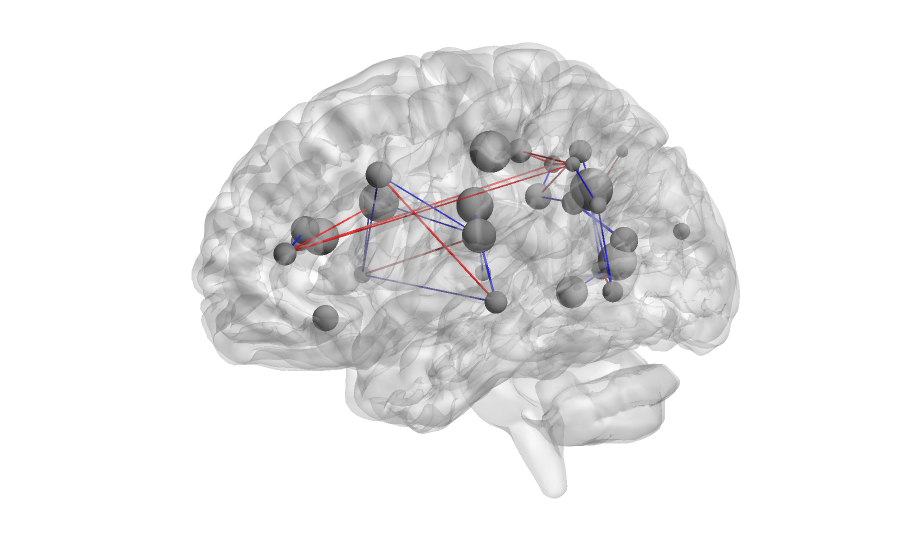
htfa.plot_network(res, connectivity, subject=0) draws the factors of subject 0 as spheres (by default at their in-brain positions, see section 14) inside a translucent brain surface and the edges of connectivity whose absolute value exceeds threshold. Node size comes from the fitted factor widths unless sizes is given. Edges are red for positive and blue for negative weights. The call returns a PIL.Image.Image.
The connectivity used from here on is subject 0’s static factor-weight correlation (res.connectivity(0)) with the diagonal set to zero. The printed values give the scale the thresholds below act on. The default threshold is 0.25.
[4]:
C0 = res.connectivity(0)
np.fill_diagonal(C0, 0)
iu = np.triu_indices(30, 1)
a = np.abs(C0[iu])
print("edges (upper triangle):", a.size)
print(
    "percentiles 50/75/90/99 of |r|:", np.round(np.percentile(a, [50, 75, 90, 99]), 2)
)
print(
    "edges with |r| > 0.5:",
    int((a > 0.5).sum()),
    "of which negative:",
    int((C0[iu] < -0.5).sum()),
)


def show(img, width=None):
    # Downscale for the docs. The image keeps its pixels when width is None.
    if width is not None:
        img = img.resize((width, round(img.height * width / img.width)), Image.LANCZOS)
    display(img)


t0 = time.perf_counter()
img = htfa.plot_network(res, C0, subject=0, threshold=0.5, size=(900, 560))
print(type(img).__name__, img.size, f"{time.perf_counter() - t0:.1f} s")
show(img)
edges (upper triangle): 435
percentiles 50/75/90/99 of |r|: [0.19 0.32 0.48 0.74]
edges with |r| > 0.5: 37 of which negative: 24
Image (900, 560) 1.1 s
3. Views
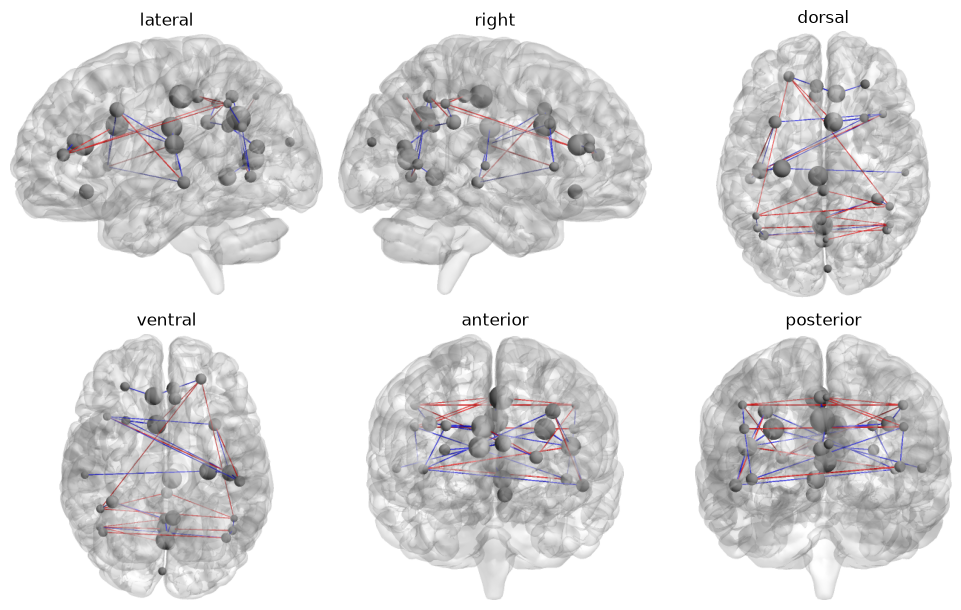
view selects the camera: 'lateral' (the same as 'left'), 'right', 'dorsal', 'ventral', 'anterior' or 'posterior'. All six are shown below with the same edges. Each image is trimmed to its non-white pixels before it is drawn, so the brains appear at different scales in different panels.
[5]:
def trim(img, bg="white"):
    # Crop to the pixels that differ from the background color.
    box = ImageChops.difference(img, Image.new("RGB", img.size, bg)).getbbox()
    return img.crop(box)


views = ["lateral", "right", "dorsal", "ventral", "anterior", "posterior"]
fig, axes = plt.subplots(2, 3, figsize=(10, 6.2))
for ax, view in zip(axes.ravel(), views, strict=False):
    im = htfa.plot_network(
        res, C0, subject=0, threshold=0.5, view=view, size=(700, 440)
    )
    ax.imshow(trim(im))
    ax.set_title(view)
    ax.axis("off")
fig.tight_layout()
plt.show()
print("'left' equals 'lateral':", brainnet.VIEWS["left"] == brainnet.VIEWS["lateral"])
'left' equals 'lateral': True
4. Edge style and threshold
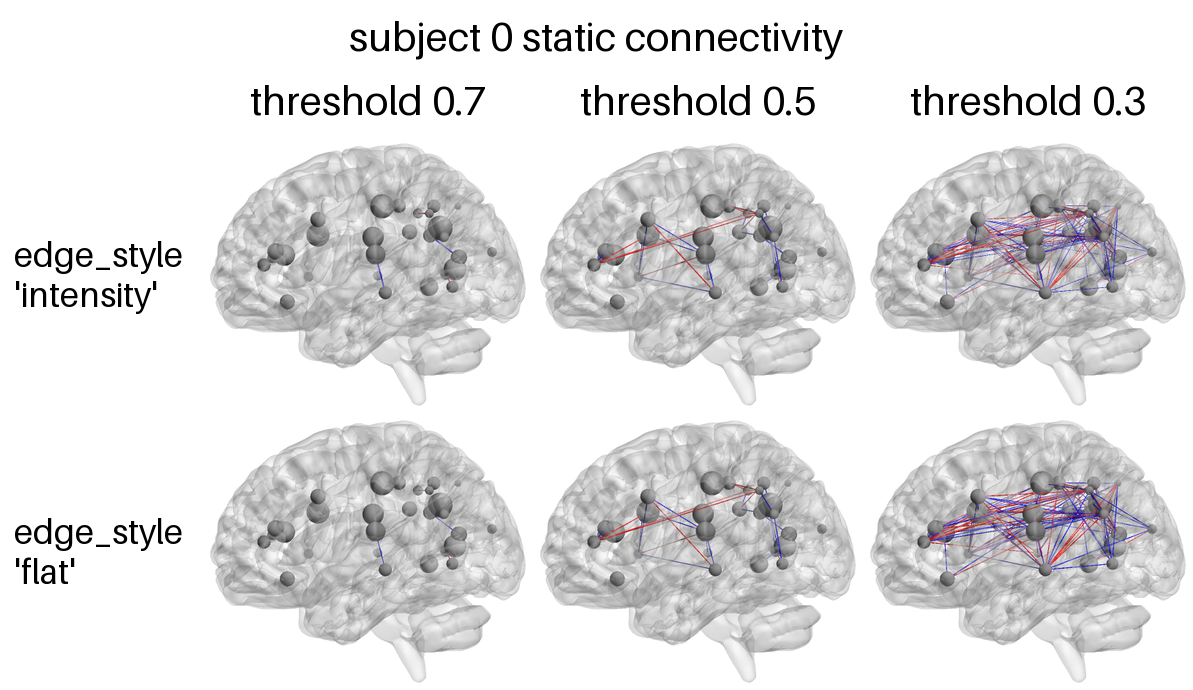
threshold keeps the edges with |r| > threshold. edge_style='intensity' (default) draws each edge as a tube whose diameter is |r| mm at opacity 0.7, so stronger edges are thicker at the same opacity; 'flat' draws every edge as a 0.5 mm opaque tube. htfa.brainnet.montage arranges the frames in a labelled grid, with rows labelled by edge style and columns by threshold. The printed counts are the number of edges that remain at each threshold.
[6]:
cols = [0.7, 0.5, 0.3]
rows = ["intensity", "flat"]
frames = [
    [
        htfa.plot_network(
            res, C0, subject=0, threshold=th, edge_style=es, size=(700, 440)
        )
        for th in cols
    ]
    for es in rows
]
for th in cols:
    print(f"threshold {th}: {int((a > th).sum())} edges")
m = brainnet.montage(
    frames,
    row_labels=[f"edge_style\n'{r}'" for r in rows],
    col_labels=[f"threshold {c}" for c in cols],
    title="subject 0 static connectivity",
    cell_width=330,
)
print(m.size)
show(m)
threshold 0.7: 8 edges
threshold 0.5: 37 edges
threshold 0.3: 132 edges
(1193, 690)
5. Colors, mesh opacity, background
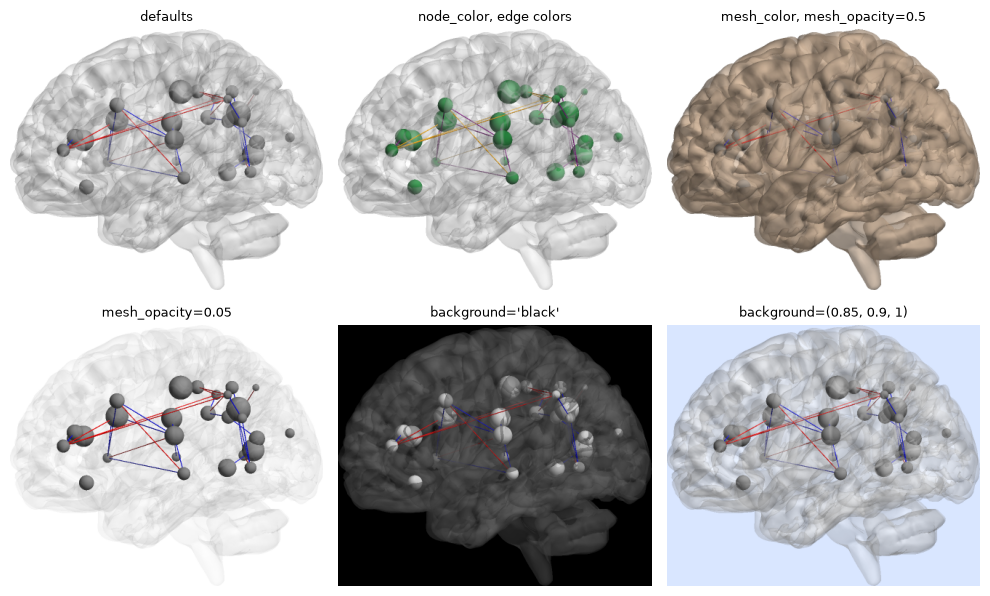
The style keywords of plot_network are node_color, positive_color, negative_color, mesh_color, mesh_opacity and background. Colors can be matplotlib color names or RGB tuples in 0-1. All panels below use edge_style='flat' and the same edges.
[7]:
opts = [
    ("defaults", {}),
    (
        "node_color, edge colors",
        dict(
            node_color=(0.1, 0.5, 0.2), positive_color="orange", negative_color="purple"
        ),
    ),
    (
        "mesh_color, mesh_opacity=0.5",
        dict(mesh_color=(0.8, 0.7, 0.6), mesh_opacity=0.5),
    ),
    ("mesh_opacity=0.05", dict(mesh_opacity=0.05)),
    (
        "background='black'",
        dict(
            background="black",
            mesh_color=(0.4, 0.4, 0.4),
            mesh_opacity=0.3,
            node_color="white",
        ),
    ),
    ("background=(0.85, 0.9, 1)", dict(background=(0.85, 0.9, 1.0))),
]
fig, axes = plt.subplots(2, 3, figsize=(10, 6.2))
for ax, (title, kw) in zip(axes.ravel(), opts, strict=False):
    im = htfa.plot_network(
        res, C0, subject=0, threshold=0.5, edge_style="flat", size=(700, 440), **kw
    )
    bg = kw.get("background", "white")
    ax.imshow(
        trim(im, tuple(round(255 * c) for c in bg) if isinstance(bg, tuple) else bg)
    )
    ax.set_title(title, fontsize=9)
    ax.axis("off")
fig.tight_layout()
plt.show()
6. Node sizes
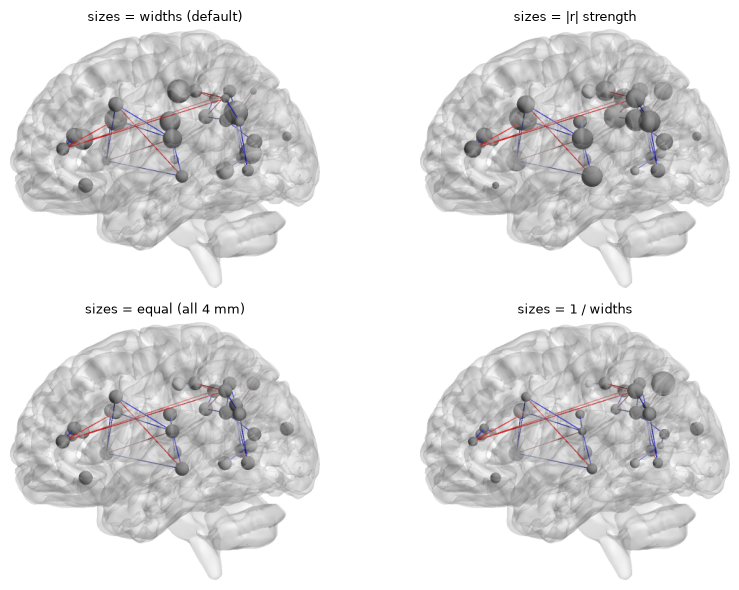
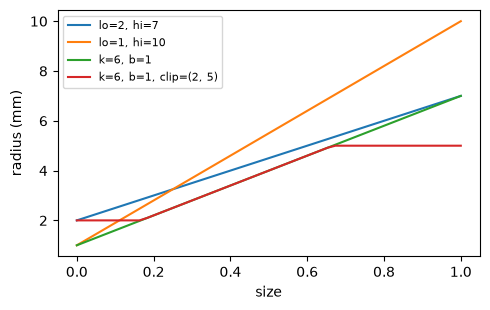
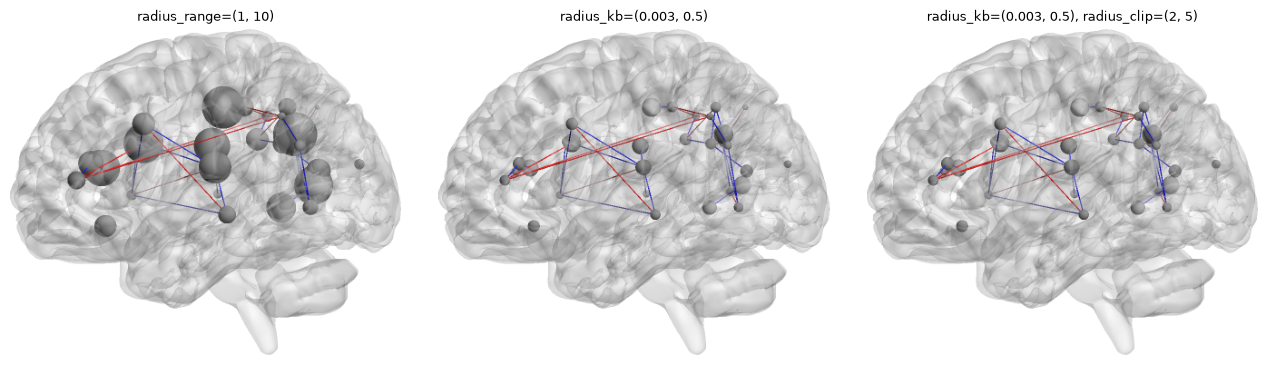
With a fit as nodes, node sizes default to the factor widths (with the default snap=True, the in-brain widths of section 14). The sizes argument replaces them with any array of length K. plot_network turns the sizes into sphere radii with htfa.brainnet.node_radius. By default the smallest size gets a 2 mm radius and the largest 7 mm; equal sizes give 4 mm radii. Three style options change the mapping:
radius_range=(lo, hi): radii of the smallest and largest size.radius_kb=(k, b): a fixed mapping, radius =k * size + bmm, so that radii are comparable between plots (BrainNet Viewer stores such values asnod.kandnod.b).radius_clip=(min, max): clips the radii afterwards.
The printed values show what node_radius gives for the widths of subject 0 under each choice.
[8]:
w = res.widths[0]
print("subject 0 widths, min / max:", np.round([w.min(), w.max()]))
k, b = 0.003, 0.5


def span(r):
    return np.round([r.min(), r.max()], 2)


print("default (lo=2, hi=7):", span(brainnet.node_radius(w)))
print("lo=1, hi=10:", span(brainnet.node_radius(w, 1, 10)))
print(f"k={k}, b={b}:", span(brainnet.node_radius(w, k=k, b=b)))
print(
    f"k={k}, b={b}, clip=(2, 5):", span(brainnet.node_radius(w, k=k, b=b, clip=(2, 5)))
)
print("equal sizes:", np.unique(brainnet.node_radius(np.full(5, 3.0))))
_, w_eff, _ = res.display_nodes(0)
print(
    "in-brain widths drawn by default, min / max:", np.round([w_eff.min(), w_eff.max()])
)
strength = np.abs(C0).sum(axis=0)
variants = [
    ("sizes = widths (default)", {}),
    ("sizes = |r| strength", dict(sizes=strength)),
    ("sizes = equal (all 4 mm)", dict(sizes=np.ones(30))),
    ("sizes = 1 / widths", dict(sizes=1.0 / w)),
]
fig, axes = plt.subplots(2, 2, figsize=(9, 6))
for ax, (title, kw) in zip(axes.ravel(), variants, strict=True):
    im = htfa.plot_network(
        res, C0, subject=0, threshold=0.5, edge_style="flat", size=(700, 440), **kw
    )
    ax.imshow(trim(im))
    ax.set_title(title, fontsize=9)
    ax.axis("off")
fig.tight_layout()
plt.show()
subject 0 widths, min / max: [ 317. 3957.]
default (lo=2, hi=7): [2. 7.]
lo=1, hi=10: [ 1. 10.]
k=0.003, b=0.5: [ 1.45 12.37]
k=0.003, b=0.5, clip=(2, 5): [2. 5.]
equal sizes: [4.]
in-brain widths drawn by default, min / max: [ 272. 1320.]
The mapping from size to radius for four settings, on sizes from 0 to 1, and plot_network with the three style options (default sizes: the in-brain widths).
[9]:
fig, ax = plt.subplots(figsize=(5, 3.2))
x = np.linspace(0, 1, 50)
for kw in [
    dict(lo=2, hi=7),
    dict(lo=1, hi=10),
    dict(k=6, b=1),
    dict(k=6, b=1, clip=(2, 5)),
]:
    ax.plot(
        x,
        brainnet.node_radius(x, **kw),
        label=", ".join(f"{a}={v}" for a, v in kw.items()),
    )
ax.set_xlabel("size")
ax.set_ylabel("radius (mm)")
ax.legend(fontsize=8)
fig.tight_layout()
plt.show()

opts = [
    ("radius_range=(1, 10)", dict(radius_range=(1, 10))),
    ("radius_kb=(0.003, 0.5)", dict(radius_kb=(0.003, 0.5))),
    (
        "radius_kb=(0.003, 0.5), radius_clip=(2, 5)",
        dict(radius_kb=(0.003, 0.5), radius_clip=(2, 5)),
    ),
]
fig, axes = plt.subplots(1, 3, figsize=(13, 3.6))
for ax, (title, kw) in zip(axes, opts, strict=True):
    im = htfa.plot_network(
        res, C0, subject=0, threshold=0.5, edge_style="flat", size=(700, 440), **kw
    )
    ax.imshow(trim(im))
    ax.set_title(title, fontsize=9)
    ax.axis("off")
fig.tight_layout()
plt.show()
7. Mesh
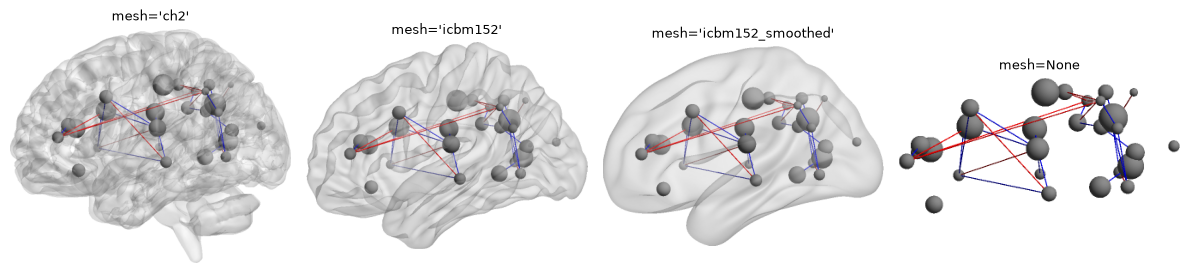
mesh takes the name of one of the three BrainNet Viewer 1.43 surfaces in htfa.brainnet.MESHES, a path to a .nv file, a (vertices, faces) pair, or None for no surface. The vertex and face counts printed below are those of the files in the cache.
[10]:
print("mesh names:", sorted(brainnet.MESHES))
meshes = ["ch2", "icbm152", "icbm152_smoothed"]
verts = {}
for name in meshes:
    v, f = brainnet.load_mesh(name)
    verts[name] = (len(v), len(f))
    print(
        f"{name}: {len(v)} vertices, {len(f)} faces; "
        f"x range {v[:, 0].min():.0f} to {v[:, 0].max():.0f} mm"
    )
fig, axes = plt.subplots(1, 4, figsize=(12, 3.2))
for ax, name in zip(axes, [*meshes, None], strict=False):
    im = htfa.plot_network(
        res, C0, subject=0, threshold=0.5, edge_style="flat", mesh=name, size=(700, 440)
    )
    ax.imshow(trim(im))
    ax.set_title(f"mesh={name!r}", fontsize=9)
    ax.axis("off")
fig.tight_layout()
plt.show()
mesh names: ['ch2', 'icbm152', 'icbm152_smoothed']
ch2: 77124 vertices, 154244 faces; x range -70 to 72 mm
icbm152: 81924 vertices, 163840 faces; x range -69 to 69 mm
icbm152_smoothed: 81924 vertices, 163840 faces; x range -63 to 63 mm
8. PNG and JPEG output, image size
out= writes the image to a file; the format follows the suffix. A .jpg file is written at JPEG quality 75 with 4:2:0 chroma subsampling; jpeg_quality= sets another quality, and also compresses the returned image when no out is given. size=(width, height) sets the pixel size (default 1600 by 1000). The sizes below are for 1600 by 1000 images; image_diff is the mean absolute RGB difference (0 to 255) between two images resized to 400 by 250. The panels show a 150 by 94
pixel patch with thin edges, magnified 4x. At quality 40 the patch shows blocking and color fringes along the edges.
[11]:
tmp = Path(tempfile.mkdtemp())
big = (1600, 1000)
base = htfa.plot_network(
    res, C0, subject=0, threshold=0.5, size=big, out=tmp / "net.png"
)
htfa.plot_network(res, C0, subject=0, threshold=0.5, size=big, out=tmp / "net.jpg")
htfa.plot_network(
    res, C0, subject=0, threshold=0.5, size=big, out=tmp / "net95.jpg", jpeg_quality=95
)
htfa.plot_network(
    res, C0, subject=0, threshold=0.5, size=big, out=tmp / "net40.jpg", jpeg_quality=40
)
for f in ["net.png", "net.jpg", "net95.jpg", "net40.jpg"]:
    print(
        f"{f:10s} {(tmp / f).stat().st_size / 1024:7.0f} KB   "
        f"image_diff vs png: {brainnet.image_diff(tmp / 'net.png', tmp / f):.4f}"
    )
box = (330, 330, 480, 424)  # a 150 x 94 pixel patch with thin edges, shown at 4x
names = ["net.png", "net.jpg", "net95.jpg", "net40.jpg"]
titles = ["PNG", "JPEG (default 75)", "JPEG 95", "JPEG 40"]
fig, axes = plt.subplots(1, 4, figsize=(12, 2.6))
for ax, f, t in zip(axes, names, titles, strict=False):
    ax.imshow(Image.open(tmp / f).crop(box).resize((600, 376), Image.NEAREST))
    ax.set_title(t, fontsize=9)
    ax.axis("off")
fig.tight_layout()
plt.show()
net.png        426 KB   image_diff vs png: 0.0000
net.jpg         87 KB   image_diff vs png: 0.1498
net95.jpg      191 KB   image_diff vs png: 0.0927
net40.jpg       57 KB   image_diff vs png: 0.3037

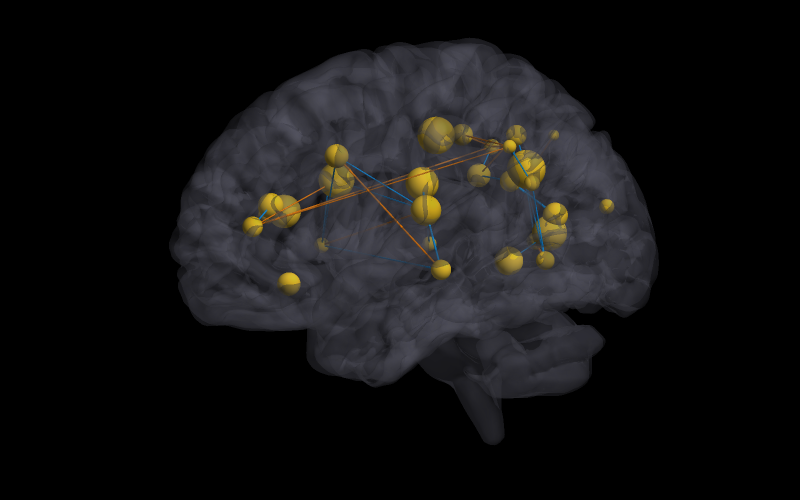
9. BrainNet Viewer option files
read_brainnet_config reads a BrainNet Viewer option file (a .mat file holding a struct EC) and config_style turns it into plot_network keywords. No option file from BrainNet Viewer is used here: the cell below writes the file with scipy.io.savemat, with only the fields config_style reads (bak.color, msh.color, msh.alpha, nod.CM, edg.CM, edg.draw_threshold). In an edg.CM colormap the first row becomes the positive edge color and the last row
the negative edge color. The view is always left lateral, whatever the file says. A .mat file without EC raises ValueError.
[12]:
cfg_path = tmp / "dark.mat"
EC = {
    "bak": {"color": np.array([0.0, 0.0, 0.0])},
    "msh": {"color": np.array([0.35, 0.35, 0.4]), "alpha": 0.25},
    "nod": {"CM": np.array([[1.0, 0.8, 0.1]])},
    "edg": {"CM": np.array([[1.0, 0.5, 0.0], [0.0, 0.6, 1.0]]), "draw_threshold": 0.5},
}
scipy.io.savemat(cfg_path, {"EC": EC})
cfg = brainnet.read_brainnet_config(cfg_path)
print("top-level fields:", sorted(cfg))
print("cfg['edg']['draw_threshold']:", cfg["edg"]["draw_threshold"])
style = brainnet.config_style(cfg)
for k, v in style.items():
    print(f"{k:15s} {v}")
try:
    scipy.io.savemat(tmp / "bad.mat", {"x": 1})
    brainnet.read_brainnet_config(tmp / "bad.mat")
except ValueError as e:
    print("ValueError:", str(e).replace(str(tmp), "<tmp>"))
img = htfa.plot_network(res, C0, subject=0, size=(800, 500), **style)
show(img)
top-level fields: ['bak', 'edg', 'msh', 'nod']
cfg['edg']['draw_threshold']: 0.5
background      (0.0, 0.0, 0.0)
mesh_color      (0.35, 0.35, 0.4)
mesh_opacity    0.25
node_color      (1.0, 0.8, 0.1)
threshold       0.5
positive_color  (1.0, 0.5, 0.0)
negative_color  (0.0, 0.6, 1.0)
ValueError: <tmp>/bad.mat has no BrainNet option struct 'EC'
10. Side-by-side panels
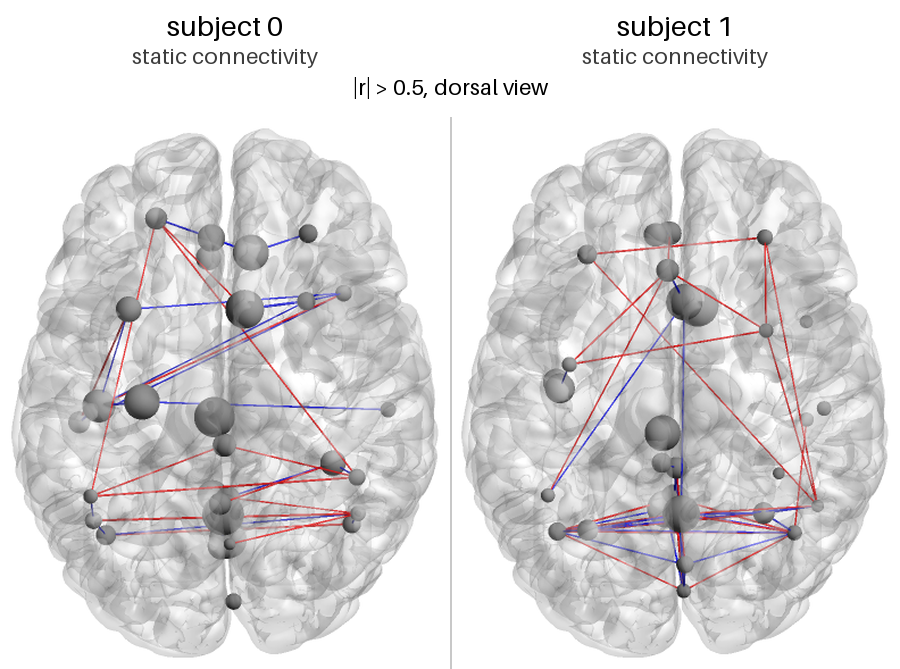
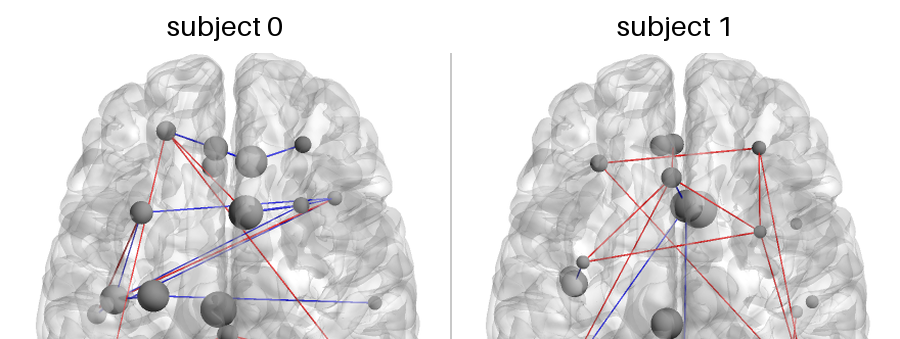
annotate_pair places two frames side by side under a header band with a title (and optional subtitle after \n) for each, and an optional caption. By default each frame is cropped to the box around the non-white pixels of both. crop=(left, top, right, bottom) selects the region of each frame instead; the second call below crops to the front half of the dorsal frames.
[13]:
C1 = res.connectivity(1)
np.fill_diagonal(C1, 0)
p = [
    htfa.plot_network(res, C, subject=s, threshold=0.5, view="dorsal", size=(800, 500))
    for s, C in [(0, C0), (1, C1)]
]
pair = brainnet.annotate_pair(
    p[0],
    p[1],
    ("subject 0\nstatic connectivity", "subject 1\nstatic connectivity"),
    caption="|r| > 0.5, dorsal view",
    width=900,
)
print(pair.size)
show(pair)
(900, 669)
Cropped version of the same pair:
[14]:
pair2 = brainnet.annotate_pair(
    p[0], p[1], ("subject 0", "subject 1"), width=900, crop=(180, 20, 620, 300)
)
print("with crop=(180, 20, 620, 300):", pair2.size, " default crop:", pair.size)
show(pair2)
with crop=(180, 20, 620, 300): (900, 339) default crop: (900, 669)
11. Time courses
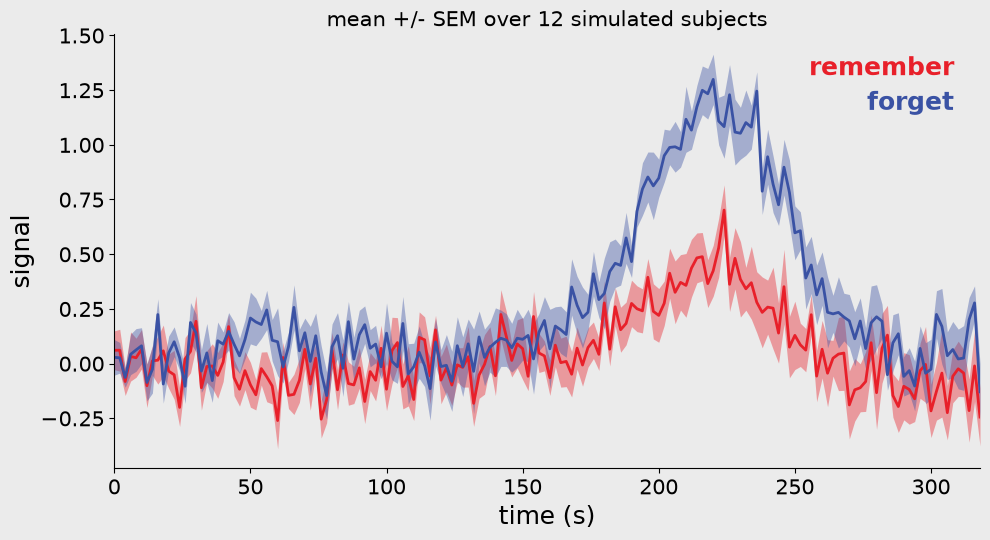
htfa.plot_timecourse draws each condition as a mean line with a +/- standard-error-of-the-mean (SEM) ribbon over subjects (rows of a (subjects, time) array); a 1D array is drawn as a single line.
The first three figures use a fictional memory-task illustration. Imagine two conditions in which a cue asks participants to remember or forget earlier material. The labels remember and forget are arbitrary dictionary keys used to demonstrate condition colors and annotations; no memory experiment is analyzed here. The arrays are generated for 12 simulated subjects, with 160 samples every 2 seconds: a random walk plus noise and a Gaussian bump centered at 220 seconds, with chosen
amplitudes of 0.5 and 1.2. The difference is built into the simulation and is not an empirical memory effect. These curves are separate from the Partly Cloudy fMRI data used elsewhere in this notebook.
[15]:
rng = np.random.default_rng(0)
S, T = 12, 160
t = np.arange(T) * 2.0  # seconds


def make(effect, rng):
    base = np.cumsum(rng.standard_normal((S, T)), axis=1) * 0.03
    bump = effect * np.exp(-0.5 * ((t - 220) / 25) ** 2)
    return base + bump + 0.3 * rng.standard_normal((S, T))


conds = {"remember": make(0.5, rng), "forget": make(1.2, rng)}
print("shape per condition:", conds["remember"].shape)
fig = htfa.plot_timecourse(
    conds,
    t,
    xlabel="time (s)",
    ylabel="signal",
    title="mean +/- SEM over 12 simulated subjects",
)
plt.show()
shape per condition: (12, 160)
smooth=n (odd n) applies a centered moving average of n samples to each subject before the mean and SEM are computed. The first and last samples are left unchanged, which is visible as a step at the right edge of the smoothed curves.
[16]:
fig, axes = plt.subplots(
    1, 3, figsize=(15, 4.2), facecolor=timecourse.SLIDE_COLORS["background"]
)
for ax, sm in zip(axes, [None, 5, 15], strict=False):
    htfa.plot_timecourse(
        conds, t, smooth=sm, ax=ax, fontsize=12, title=f"smooth={sm}", xlabel="time (s)"
    )
plt.show()
print("moving_average(range(7), 3):", timecourse.moving_average(np.arange(7.0), 3))
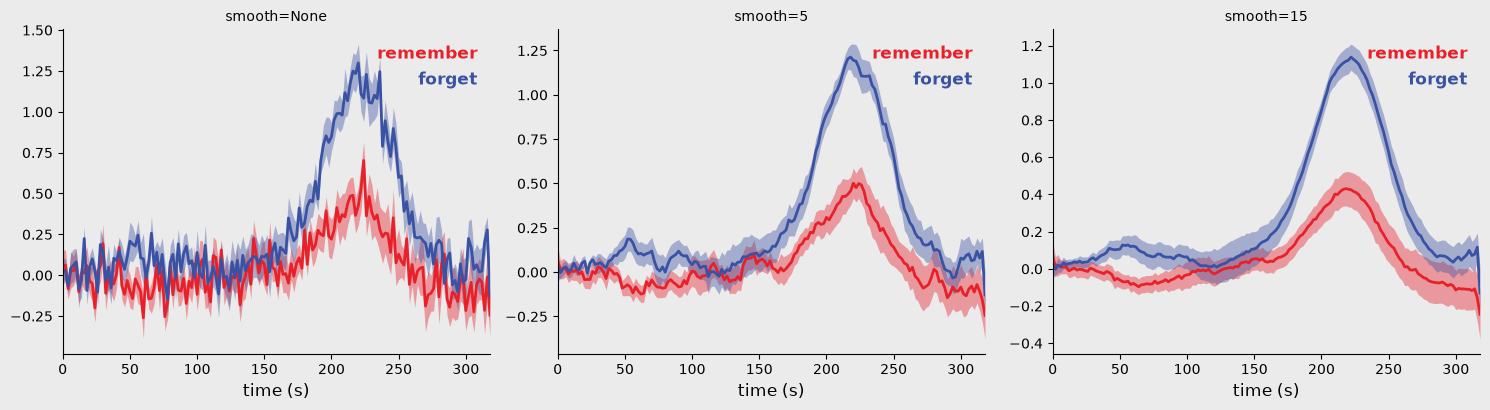
moving_average(range(7), 3): [0. 1. 2. 3. 4. 5. 6.]
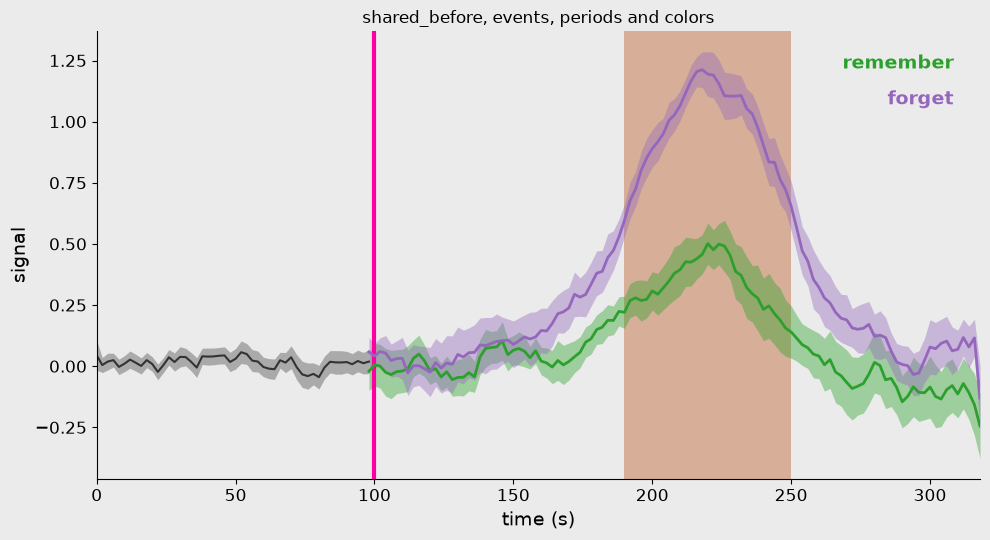
shared_before=x draws the mean of all conditions as one dark curve before x, and the condition curves start one sample earlier. events adds vertical magenta lines, periods shades x ranges, colors overrides the default red and blue condition colors, and fontsize, title, xlabel and ylabel set the text. The default colors and the background are in htfa.timecourse.SLIDE_COLORS.
In the fictional illustration, events=[100] marks an imagined cue and periods=[(190, 250)] highlights an arbitrary interval around the generated bump. These times are plotting examples, not events in Partly Cloudy. shared_before=100 only changes how the curves are drawn before the cue; it does not impose equality on the generated data or test whether the conditions differ. Other applications can supply their own condition names, event times, and highlighted intervals.
[17]:
fig = htfa.plot_timecourse(
    conds,
    t,
    smooth=5,
    shared_before=100,
    events=[100.0],
    periods=[(190, 250)],
    colors={"remember": "tab:green", "forget": "tab:purple"},
    xlabel="time (s)",
    ylabel="signal",
    title="shared_before, events, periods and colors",
    fontsize=14,
)
plt.show()
print("SLIDE_COLORS:", timecourse.SLIDE_COLORS)
SLIDE_COLORS: {'red': '#E8202A', 'blue': '#3A52A4', 'dark': '#333333', 'event': '#FF00A0', 'period': '#D2A184', 'background': '#EBEBEB'}
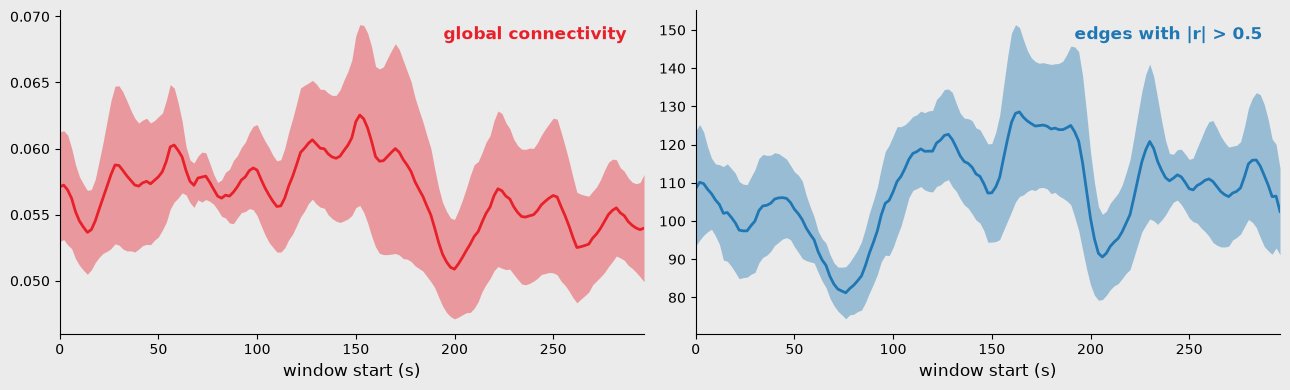
Movie-viewing data, distinct from the fictional memory curves above. res.dynamic_connectivity(subject, window=20) gives one correlation matrix per 20-sample window. timecourse.global_connectivity (mean of the upper triangle including the diagonal) and timecourse.edge_count (number of edges above a threshold) turn each subject’s sequence of matrices into one curve; the ribbons are mean +/- SEM over the six subjects. Here the x axis is the start of each window in seconds (2 s per
sample). The two quantities are drawn in separate axes.
[18]:
frames = np.stack([res.dynamic_connectivity(s, window=20) for s in range(6)])
print("dynamic connectivity per subject:", frames.shape)
gc = np.stack([timecourse.global_connectivity(f) for f in frames])
ec = np.stack([timecourse.edge_count(f, threshold=0.5) for f in frames])
print(
    "global connectivity per window, mean over subjects, min / max:",
    np.round([gc.mean(0).min(), gc.mean(0).max()], 3),
)
fig, axes = plt.subplots(
    1, 2, figsize=(13, 4), facecolor=timecourse.SLIDE_COLORS["background"]
)
x = np.arange(gc.shape[1]) * 2.0
htfa.plot_timecourse(
    {"global connectivity": gc},
    x,
    smooth=5,
    ax=axes[0],
    fontsize=12,
    xlabel="window start (s)",
)
htfa.plot_timecourse(
    {"edges with |r| > 0.5": ec},
    x,
    smooth=5,
    ax=axes[1],
    fontsize=12,
    xlabel="window start (s)",
    colors={"edges with |r| > 0.5": "tab:blue"},
)
plt.show()
dynamic connectivity per subject: (6, 149, 30, 30)
global connectivity per window, mean over subjects, min / max: [0.05  0.064]
12. matplotlib and nilearn plots on HTFAResults
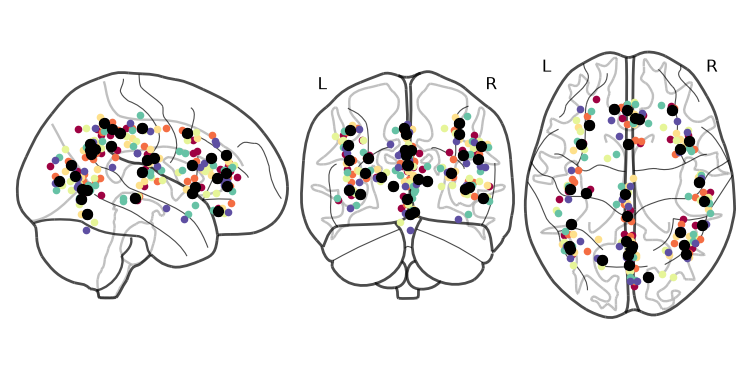
These three methods need the plot extra. With 3D coordinates plot_nodes and plot_connectivity return nilearn glass-brain displays; with 2D coordinates they return matplotlib figures. The next two figures use the real fit.
plot_nodes() with the default subject='global' draws the HTFA template centers in black (by default at their in-brain positions, see section 14) and every subject’s centers in a different color (a Spectral colormap).
[19]:
fig = res.plot_nodes()
plt.show()
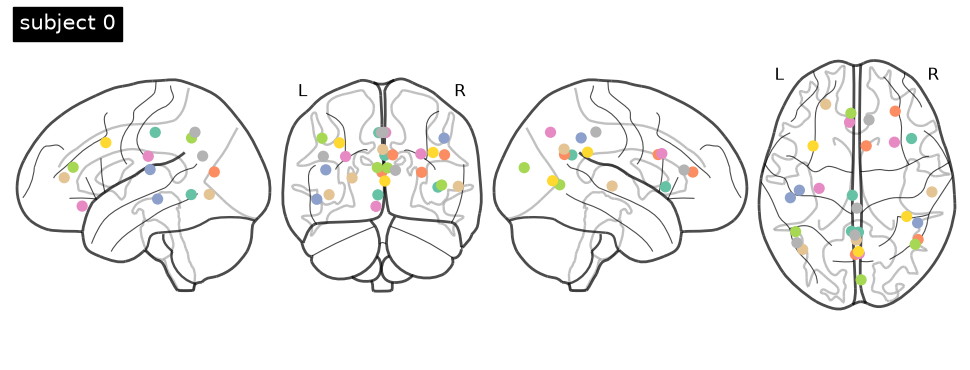
subject=0 draws that subject’s centers only; extra keyword arguments go to nilearn.plotting.plot_connectome (here display_mode and title).
[20]:
disp = res.plot_nodes(subject=0, display_mode="lyrz", title="subject 0")
plt.show()
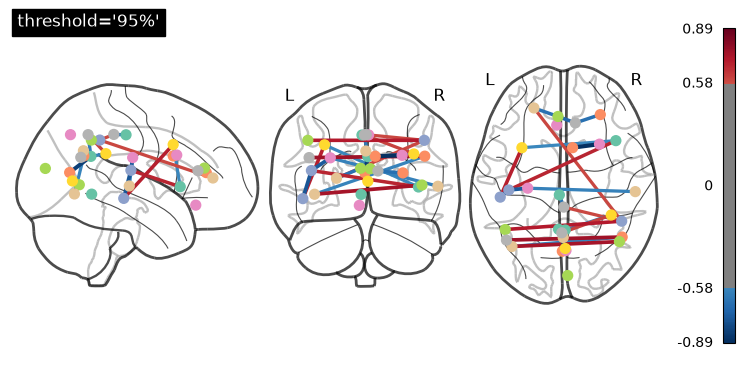
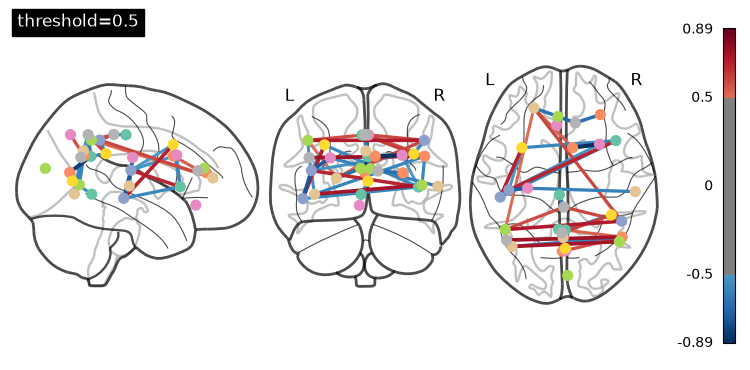
plot_connectivity draws the subject’s edges between factor centers with nilearn’s plot_connectome. threshold is a percentage string ('95%' keeps the edges at or above the 95th percentile of |r|) or an absolute value. In the colorbar, the gray band spans the values below the threshold.
[21]:
for th in ["95%", 0.5]:
    disp = res.plot_connectivity(subject=0, threshold=th)
    disp.title(f"threshold={th!r}", size=12)
    plt.show()
13. 2D data: plot_nodes, plot_connectivity, plot_reconstruction
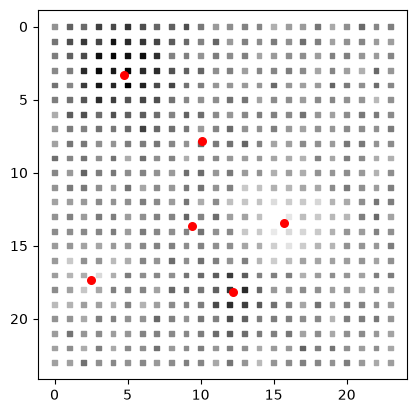
On 2D data the same methods draw matplotlib figures, so ax= places them in your own layout. The data here are synthetic: a 24 by 24 image grid, 60 samples, 6 factors (htfa.make_tfa_data), fitted with htfa.fit. plot_connectivity accepts a percentage string (the percentile of the absolute correlations) or an absolute threshold. plot_reconstruction shows one sample of the standardized data next to the reconstruction.
For 3D data, plot_reconstruction needs NIfTI input (an affine); the fit above uses arrays and coordinates, so it raises ValueError. The printed correlations show that no edge of this fit has |r| above 0.5, so the third panel of the connectivity figure has nodes but no edges.
[22]:
X2, R2, _ = htfa.make_tfa_data((24, 24), 60, K=6, noise=0.2, random_state=0)
res2 = htfa.fit(
    X2, K=6, coords=R2, standardize=False, init="ncorr", max_iter=30, random_state=0
)
fig = res2.plot_nodes()
plt.show()
fig, axes = plt.subplots(1, 3, figsize=(13, 4))
for ax, th in zip(axes, ["0%", "50%", 0.5], strict=False):
    res2.plot_connectivity(threshold=th, ax=ax)
    ax.set_title(f"threshold={th!r}")
plt.show()
C2 = res2.connectivity()
np.fill_diagonal(C2, 0)
print(
    "2D fit, |r| values off the diagonal (upper triangle):",
    np.round(np.sort(np.abs(C2[np.triu_indices(6, 1)])), 2),
)
fig = res2.plot_reconstruction(sample=5)
plt.show()
try:
    res.plot_reconstruction(subject=0)
except ValueError as e:
    print("ValueError:", e)
plt.close("all")
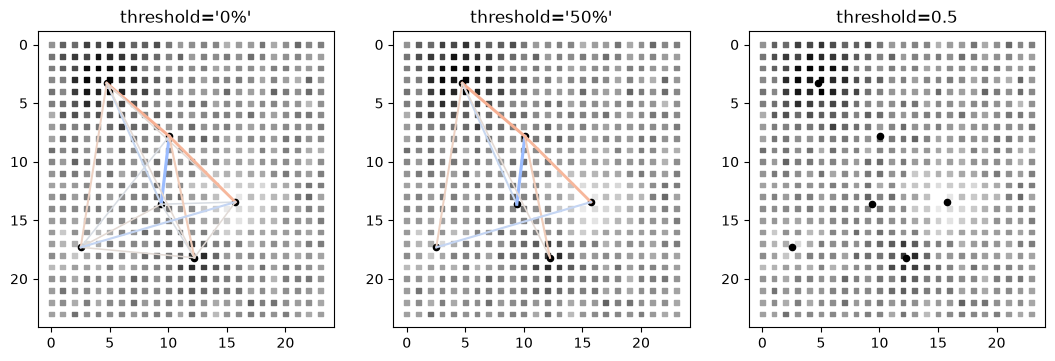
2D fit, |r| values off the diagonal (upper triangle): [0.03 0.03 0.04 0.04 0.04 0.05 0.05 0.05 0.14 0.15 0.18 0.18 0.34 0.38
 0.42]
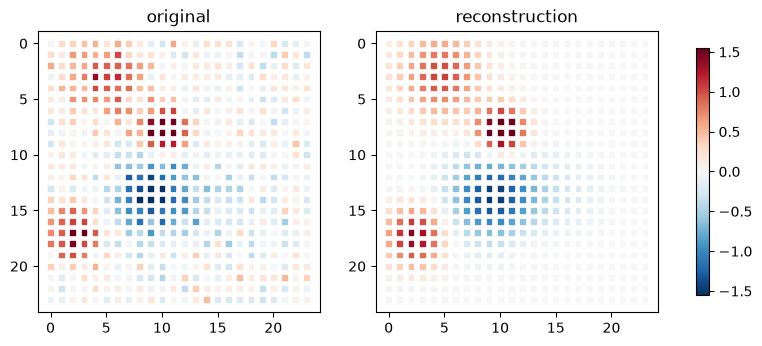
ValueError: 3D plot_reconstruction needs NIfTI input (affine)
14. Node positions inside the brain (snapping)
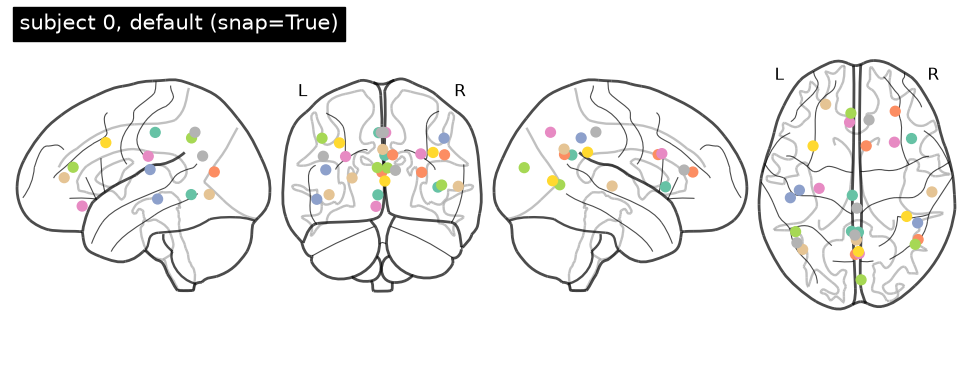
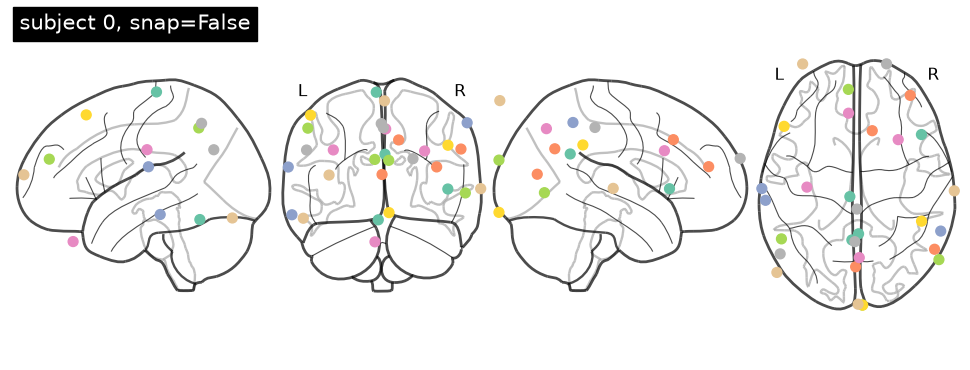
A fitted center is not constrained to lie inside the brain: a Gaussian RBF centered just outside the cortex still reaches into it, and that is how a fit can explain a blurry cortical activation. The fit therefore keeps its centers as they are. For plotting single-component RBFs and summary views, each node represents the part of its profile that lies inside the brain: its position is the RBF-weighted centroid of the in-brain voxels, and its size comes from the weighted spread
(lambda_eff = 2 * sigma_eff**2). A node well inside the brain keeps its center and width. Snapping is on by default in plot_network, animate_network, plot_nodes, and plot_connectivity. In component views, the fitted spatial lobes remain in place while snapping adjusts the connection anchors; Tutorial 12 illustrates those views. snap=False draws the fitted centers and widths instead, and mask= replaces the in-brain voxels (default: the subject’s own voxels, or all
subjects’ voxels for the template).
The left panel below uses snap=False and the right panel the default, for the same subject and edges.
[23]:
kw = dict(subject=0, threshold=0.5, edge_style="flat", size=(800, 500))
img_off = htfa.plot_network(res, C0, snap=False, **kw)
img_on = htfa.plot_network(res, C0, **kw)
print(
    "image_diff, snap=False vs default:", round(brainnet.image_diff(img_off, img_on), 2)
)
pair = brainnet.annotate_pair(
    img_off,
    img_on,
    ("snap=False", "snap=True (default)"),
    caption="subject 0, |r| > 0.5, lateral view",
    width=900,
)
show(pair)
image_diff, snap=False vs default: 4.96
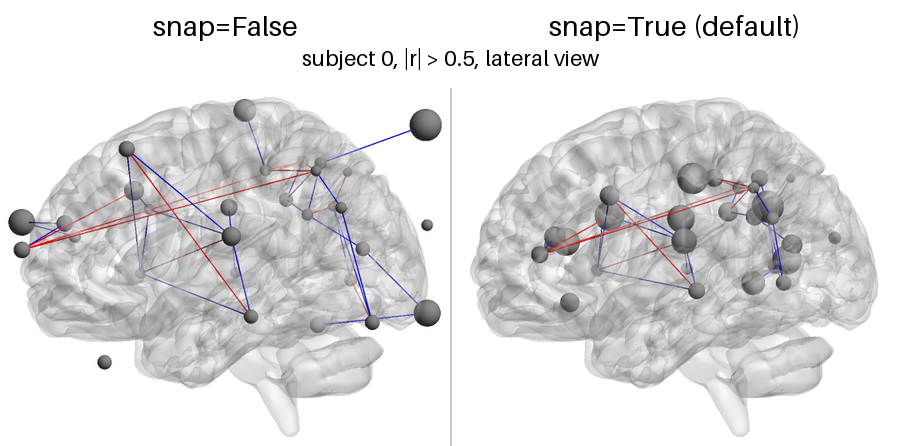
res.display_nodes(subject) returns the centers and widths that a plot with the default snap=True draws, plus an info dictionary. The table lists, for the nodes of subject 0 that moved the most: how far the node moved (distance), whether the centroid had to be pulled back into the mask (snapped, for a concave mask), whether nearest voxels were tied (ambiguous), the fraction of the RBF mass that is inside the brain (mass_fraction), and lambda_eff / lambda. The counts
are printed for subject 0 and for the template.
[24]:
pd = htfa.require("pandas", extra="nilearn")

before = res.centers[0].copy()
centers_eff, widths_eff, info = res.display_nodes(0)
table = pd.DataFrame(
    {
        "distance (mm)": info["distance"],
        "snapped": info["snapped"],
        "ambiguous": info["ambiguous"],
        "mass_fraction": info["mass_fraction"],
        "lambda": res.widths[0],
        "lambda_eff": widths_eff,
        "lambda_eff/lambda": info["width_ratio"],
    }
).round(2)
print(
    "subject 0: nodes moved by more than 5 mm:",
    int((info["distance"] > 5).sum()),
    "of",
    len(table),
)
print("subject 0: nodes moved by more than 10 mm:", int((info["distance"] > 10).sum()))
_, _, ginfo = res.display_nodes("global")
print(
    "template: moved by more than 5 mm:",
    int((ginfo["distance"] > 5).sum()),
    " more than 10 mm:",
    int((ginfo["distance"] > 10).sum()),
)
print(
    "subject 0: snapped:",
    int(info["snapped"].sum()),
    " ambiguous:",
    int(info["ambiguous"].sum()),
)
print(
    "fitted centers unchanged by display_nodes:", np.array_equal(res.centers[0], before)
)
table.sort_values("distance (mm)", ascending=False).head(8)
subject 0: nodes moved by more than 5 mm: 26 of 30
subject 0: nodes moved by more than 10 mm: 23
template: moved by more than 5 mm: 28  more than 10 mm: 22
subject 0: snapped: 0  ambiguous: 0
fitted centers unchanged by display_nodes: True
[24]:
| distance (mm) | snapped | ambiguous | mass_fraction | lambda | lambda_eff | lambda_eff/lambda | |
|---|---|---|---|---|---|---|---|
| 23 | 58.75 | False | False | 0.14 | 3956.77 | 1320.46 | 0.33 |
| 21 | 45.49 | False | False | 0.19 | 3139.26 | 1189.88 | 0.38 |
| 28 | 43.69 | False | False | 0.20 | 3078.50 | 1122.43 | 0.36 |
| 25 | 33.95 | False | False | 0.20 | 1495.52 | 633.61 | 0.42 |
| 19 | 32.58 | False | False | 0.24 | 1431.96 | 760.59 | 0.53 |
| 24 | 30.53 | False | False | 0.20 | 1220.31 | 562.50 | 0.46 |
| 1 | 29.60 | False | False | 0.39 | 2477.22 | 1275.91 | 0.52 |
| 10 | 27.48 | False | False | 0.37 | 1921.96 | 1017.75 | 0.53 |
htfa.brainnet.effective_nodes(centers, widths, mask) does the same computation for any centers. For a bare array of MNI centers, htfa.brainnet.mni_mask() gives the 2 mm MNI152 brain mask that plot_network uses by default for such input (it ships with nilearn). Below, the template centers of the fit are used as bare arrays: once with their widths, and once without widths, in which case each node is a point that stays if it is inside the mask and otherwise moves to the nearest mask
voxel.
[25]:
mask = brainnet.mni_mask()
print(
    "mni_mask:",
    mask.shape,
    "voxel centers, x range",
    mask[:, 0].min(),
    "to",
    mask[:, 0].max(),
    "mm",
)
c_eff, w_eff_g, info_g = brainnet.effective_nodes(
    res.global_centers, res.global_widths, mask
)
c_pt, _, info_pt = brainnet.effective_nodes(res.global_centers, None, mask)
print(
    "with widths: moved > 5 mm:",
    int((info_g["distance"] > 5).sum()),
    " > 10 mm:",
    int((info_g["distance"] > 10).sum()),
)
print(
    "as points:   moved > 0 mm:",
    int((info_pt["distance"] > 0).sum()),
    " > 10 mm:",
    int((info_pt["distance"] > 10).sum()),
)
print("info keys:", sorted(info_g))
print(
    "mass_fraction of the template nodes, min / median / max:",
    np.round(
        [
            info_g["mass_fraction"].min(),
            np.median(info_g["mass_fraction"]),
            info_g["mass_fraction"].max(),
        ],
        2,
    ),
)
mni_mask: (235375, 3) voxel centers, x range -72.0 to 72.0 mm
with widths: moved > 5 mm: 28  > 10 mm: 21
as points:   moved > 0 mm: 4  > 10 mm: 1
info keys: ['ambiguous', 'distance', 'mass_fraction', 'sigma', 'snapped', 'width_ratio']
mass_fraction of the template nodes, min / median / max: [0.18 0.52 0.91]
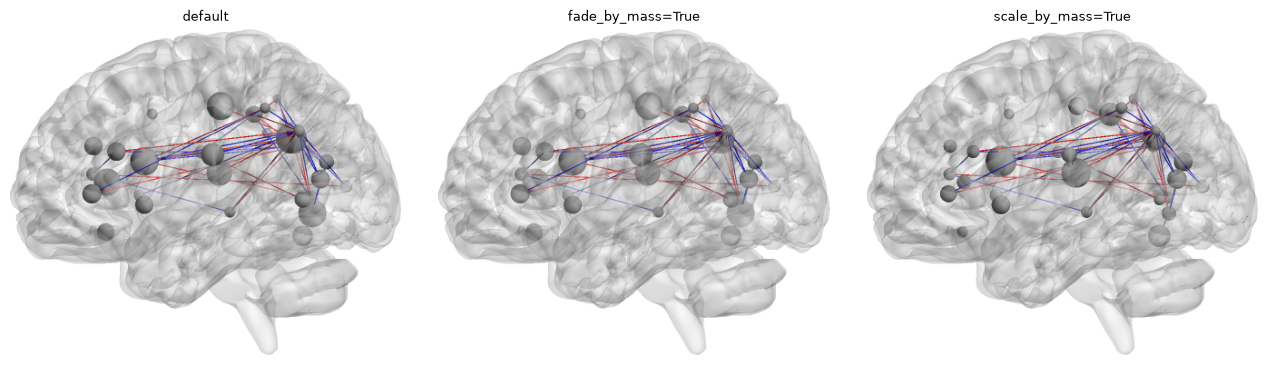
Nodes that lie mostly outside the brain have a small mass_fraction. fade_by_mass=True draws a node with opacity 0.15 + 0.85 * mass_fraction (a float sets the floor instead of 0.15), and scale_by_mass=True multiplies the node sizes by mass_fraction before they are mapped to radii. Both need snap=True. Panels, left to right: default, fade_by_mass=True, scale_by_mass=True; the template nodes are drawn with the template’s ISFC edges.
[26]:
Cg = res.isfc()
np.fill_diagonal(Cg, 0)
mass = res.display_nodes("global")[2]["mass_fraction"]
print("template mass_fraction, min / max:", np.round([mass.min(), mass.max()], 2))
variants = [
    ("default", {}),
    ("fade_by_mass=True", dict(fade_by_mass=True)),
    ("scale_by_mass=True", dict(scale_by_mass=True)),
]
fig, axes = plt.subplots(1, 3, figsize=(13, 3.6))
for ax, (title, extra) in zip(axes, variants, strict=True):
    im = htfa.plot_network(
        res, Cg, threshold=0.1, edge_style="flat", size=(700, 440), **extra
    )
    ax.imshow(trim(im))
    ax.set_title(title, fontsize=9)
    ax.axis("off")
fig.tight_layout()
plt.show()
template mass_fraction, min / max: [0.18 0.91]
The glass-brain plot_nodes follows the same rule. The first figure is the default (in-brain positions), the second snap=False (the fitted centers).
[27]:
res.plot_nodes(subject=0, display_mode="lyrz", title="subject 0, default (snap=True)")
plt.show()
res.plot_nodes(
    subject=0, display_mode="lyrz", snap=False, title="subject 0, snap=False"
)
plt.show()
15. Animation options
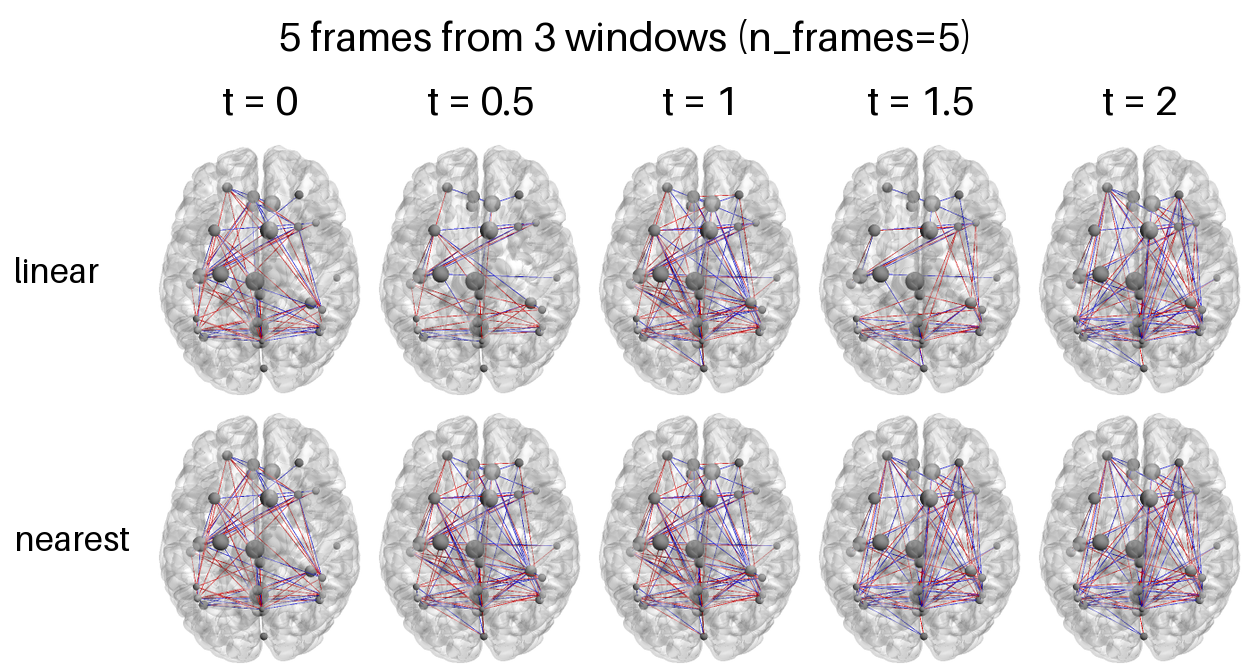
htfa.animate_network and res.animate_network write an mp4 or a looping GIF. By default the movie has one frame per connectivity window and a fixed camera, and fps (default 10) sets the frame rate. Three more options change this:
duration=(seconds) gives the movieround(duration * fps)frames, whatever the number of windowsT. Movie frameiofnshows the window timet = i * (T - 1) / (n - 1), so the windows play in slow motion (n > T) or fast forward (n < T).n_frames=sets the number of frames directly.interpolation=sets what a frame between two windows shows:'linear'(default) draws the weighted mix of the two matrices, so an edge fades in or out as its weight crossesthreshold, and'nearest'draws the nearest window.spin=(x, y, z)turns the brainx,yandzfull turns about the MNI x, y and z axes over the whole movie, in that order, about the center of the mesh’s bounding box. Fractions such as 0.5 are allowed. The camera orbits the brain together with its light and keeps the parallel projection. Its zoom is the largest that keeps the whole brain inside every frame, so a spinning brain is drawn smaller than with a fixedview. Framekofnis turned byk / nofspin, so a whole number of turns loops without a repeated frame.
A single (K, K) matrix with duration (or n_frames) gives a movie of fixed edges, for a spin. captions= takes one string per window (a frame between windows takes the caption of the nearest one) or a function of the window time t.
The GIF below spins the template network of section 14 (template ISFC, |r| > 0.1, flat edges) once about the vertical (z) axis: 3 s at 10 frames per second, 400 x 250 pixels. Each frame is 1/30 of a turn further than the one before it.
[28]:
# Figures embedded in the documentation (./figures outside the docs).
DOCS = Path.cwd().parent / "_static"
STATIC = DOCS / "tutorials" if DOCS.is_dir() else Path("figures")
STATIC.mkdir(parents=True, exist_ok=True)
t0 = time.perf_counter()
gif = res.animate_network(
    STATIC / "11_spin.gif",
    connectivity=Cg,
    fps=10,
    duration=3,
    spin=(0, 0, 1),
    threshold=0.1,
    edge_style="flat",
    size=(400, 250),
)
with Image.open(gif) as g:
    n_gif = g.n_frames
print(
    f"{gif.name}: {n_gif} frames, {gif.stat().st_size / 1e6:.2f} MB, "
    f"{time.perf_counter() - t0:.1f} s to render"
)
encoded_gif = base64.b64encode(gif.read_bytes()).decode("ascii")
display(
    HTML(
        f'<img src="data:image/gif;base64,{encoded_gif}" '
        'alt="Template network rotating about the z axis">'
    )
)
11_spin.gif: 30 frames, 1.32 MB, 1.4 s to render

The animation is rendered from Cg above. Its camera completes one rotation about the z axis while connectivity remains fixed.
Interpolation. Three windows of subject 0’s sliding-window connectivity (window=20; windows 0, 60 and 120), drawn as 5 frames with n_frames=5, so the frames are at t = 0, 0.5, 1, 1.5, 2. With 'linear' the frames at t = 0.5 and 1.5 show the mean of two windows: only the edges with |r| > 0.5 in that mean are drawn. With 'nearest' they repeat the following window (halves round up). Dorsal view, flat edges.
[29]:
D = res.dynamic_connectivity(0, window=20)
picks = [0, 60, 120]
times = np.linspace(0, len(picks) - 1, 5)
kw = dict(subject=0, threshold=0.5, edge_style="flat", view="dorsal", size=(480, 300))
rows = []
for mode in ["linear", "nearest"]:
    folder = tmp / f"interp_{mode}"
    res.animate_network(
        tmp / f"{mode}.gif",
        connectivity=D[picks],
        n_frames=5,
        interpolation=mode,
        frames_dir=folder,
        **kw,
    )
    rows.append([folder / f"{k}.png" for k in range(1, 6)])


def n_edges(E, th=0.5):
    return int((np.abs(E[np.triu_indices(len(E), 1)]) > th).sum())


a, b, c = D[picks]
print("edges per window (0, 60, 120):", [n_edges(E) for E in (a, b, c)])
print(
    "edges per 'linear' frame:",
    [n_edges(E) for E in (a, (a + b) / 2, b, (b + c) / 2, c)],
)
grid = brainnet.montage(
    rows,
    ["linear", "nearest"],
    [f"t = {t:g}" for t in times],
    title="5 frames from 3 windows (n_frames=5)",
    cell_width=220,
)
show(grid)
edges per window (0, 60, 120): [84, 112, 109]
edges per 'linear' frame: [84, 51, 112, 68, 109]
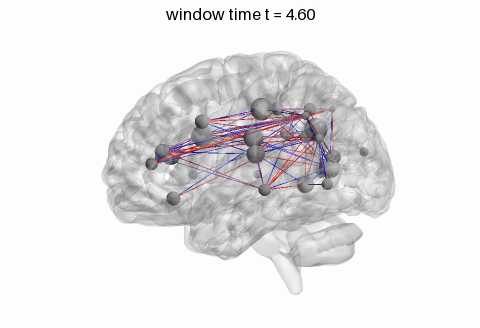
Duration, frame rate and caption functions. Ten windows played over 4 s at 12 frames per second give 48 frames, about five per window. The caption function receives the window time of each frame. The mp4 is written to a temporary folder; the middle frame is shown.
[30]:
iio = htfa.require("imageio.v2")

mp4 = res.animate_network(
    tmp / "slow.mp4",
    subject=0,
    connectivity=D[:10],
    fps=12,
    duration=4,
    captions=lambda t: f"window time t = {t:.2f}",
    threshold=0.5,
    edge_style="flat",
    size=(480, 300),
)
reader = iio.get_reader(mp4, "ffmpeg")
try:
    n = reader.count_frames()
    fps = reader.get_meta_data()["fps"]
    middle = Image.fromarray(reader.get_data(n // 2))
finally:
    reader.close()
print(f"10 windows -> {n} frames at {fps:g} fps = {n / fps:g} s")
show(middle)
10 windows -> 48 frames at 12 fps = 4 s
Notes
plot_networkneeds thebrain3dextra and the NITRC meshes; the time-course andHTFAResultsplots need onlyplot. htfa installs the extras and downloads the meshes the first time they are needed.Rendering is off-screen with pyvista.