Connectivity and dynamics on real fMRI

This notebook uses a movie-viewing dataset as an illustrative connectivity workflow. It fits HTFA to five adults from nilearn’s development_fmri dataset, then summarizes correlations between the fitted factor time courses: hubs on a glass brain, a static network retaining its strongest 25% of edges, sliding-window connectivity, inter-subject functional correlation (ISFC), and an ISFC animation.
In development_fmri, children and adults watch the same short animated film, Pixar’s Partly Cloudy. This example selects adults. Each run contains 168 brain volumes acquired 2 seconds apart (the repetition time, or TR), resampled to 4 mm voxels in the common Montreal Neurological Institute (MNI) coordinate space. Aligned time point t refers to the same movie moment for every participant, providing the correspondence needed for this ISFC analysis.
Within-subject connectivity can also describe resting-state or other task recordings. ISFC instead requires corresponding samples across participants, such as aligned responses to a shared stimulus; movie viewing is one useful example, not a requirement of HTFA fitting or plotting.
The fit below is deliberately small (K = 20, subsampled, 3 global iterations) so the notebook runs in a few minutes; it does not converge, and the factors should be read as an illustration of the workflow. The Validation page has the larger real-data checks.
[2]:
# Install htfa if it is missing (for example on Colab); other packages
# install themselves the first time they are needed.
try:
    import htfa  # noqa: F401
except ImportError:
    %pip install -q htfa
[3]:
import os
import time
import warnings

import numpy as np
from IPython.display import Image
from sklearn.exceptions import ConvergenceWarning

import htfa

plt = htfa.require("matplotlib.pyplot")
animation = htfa.require("matplotlib.animation")
FuncAnimation, PillowWriter = animation.FuncAnimation, animation.PillowWriter
datasets = htfa.require("nilearn.datasets")
image = htfa.require("nilearn.image")
masking = htfa.require("nilearn.masking")
plotting = htfa.require("nilearn.plotting")

data = datasets.fetch_development_fmri(n_subjects=5, age_group="adult", verbose=0)
print("subjects:", len(data.func))
print("image shape:", image.load_img(data.func[0]).shape)
subjects: 5
image shape: (50, 59, 50, 168)
1. Masking, cleaning and fitting
An EPI mask is computed for each run and the five masks are intersected, so all subjects share the same voxels. Each run is linearly detrended and the dataset’s reduced confound set (motion, CompCor, CSF and white-matter signals) is regressed out with nilearn.image.clean_img. htfa.fit then z-scores each voxel (standardize='auto') and fits HTFA.
[4]:
mask = masking.intersect_masks(
    [masking.compute_epi_mask(f) for f in data.func], threshold=1.0
)
cleaned = [
    image.clean_img(f, detrend=True, standardize=None, confounds=c, mask_img=mask)
    for f, c in zip(data.func, data.confounds, strict=True)
]
t0 = time.perf_counter()
with warnings.catch_warnings(record=True) as caught:
    warnings.simplefilter("always", ConvergenceWarning)
    res = htfa.fit(
        cleaned,
        K=20,
        mask=mask,
        max_global_iter=3,
        max_local_iter=3,
        max_voxels=1000,
        max_trs=40,
        init="ncorr",
        n_jobs=3,
        random_state=0,
    )
print(f"fit time: {time.perf_counter() - t0:.0f} s")
print("warnings:", sorted({w.category.__name__ for w in caught}))
print("voxels per subject:", [s.data.shape[0] for s in res.subjects])
print("weights per subject:", [w.shape for w in res.weights])
fit time: 5 s
warnings: ['ConvergenceWarning']
voxels per subject: [21748, 21748, 21748, 21748, 21748]
weights per subject: [(20, 168), (20, 168), (20, 168), (20, 168), (20, 168)]
The ConvergenceWarning is expected with only 3 global iterations.
2. Hubs on a glass brain
res.global_centers are the template factor centers in MNI millimetres. Below, each node is a template factor; node size is its strength (the sum of its absolute ISFC values with the other factors), so large nodes are the factors most correlated with the rest of the network across subjects. The second panel uses subject 0’s own centers and its own static connectivity.
[5]:
C = res.isfc()
np.fill_diagonal(C, 0)
strength = np.abs(C).sum(axis=0)
fig, axes = plt.subplots(2, 1, figsize=(8, 6))
plotting.plot_connectome(
    np.zeros_like(C),
    res.global_centers,
    node_size=20 + 200 * strength / strength.max(),
    node_color="tab:red",
    display_mode="lyrz",
    colorbar=False,
    axes=axes[0],
    title="template factors, size = ISFC strength",
)
C0 = res.connectivity(0)
np.fill_diagonal(C0, 0)
s0 = np.abs(C0).sum(axis=0)
plotting.plot_connectome(
    np.zeros_like(C0),
    res.centers[0],
    node_size=20 + 200 * s0 / s0.max(),
    node_color="tab:blue",
    display_mode="lyrz",
    colorbar=False,
    axes=axes[1],
    title="subject 0 factors, size = static connectivity strength",
)
plt.show()
top = np.argsort(strength)[::-1][:3]
print("strongest template factors:", top, "strength:", np.round(strength[top], 2))
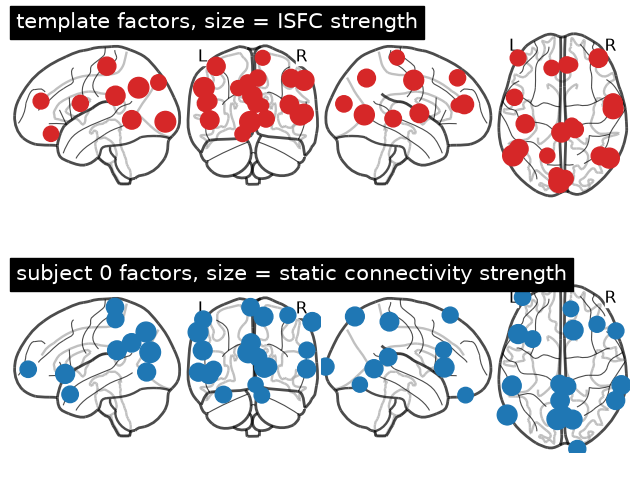
strongest template factors: [ 3 9 18] strength: [1.33 1.32 1.24]
3. Static connectome, thresholded at 75%
res.connectivity(s) is the Pearson correlation between subject s’s factor weight time courses (htfa.static_connectivity). The subject matrices are averaged in Fisher-z space and drawn with edge_threshold="75%", which keeps the edges whose absolute value is above the 75th percentile.
[6]:
Z = np.mean(
    [np.arctanh(np.clip(res.connectivity(s), -0.999999, 0.999999)) for s in range(5)],
    axis=0,
)
S = np.tanh(Z)
np.fill_diagonal(S, 0)
plotting.plot_connectome(
    S,
    res.global_centers,
    edge_threshold="75%",
    colorbar=False,
    node_size=20,
    edge_vmin=-1,
    edge_vmax=1,
    title="mean static connectivity, top 25% of edges",
)
plt.show()
upper = S[np.triu_indices_from(S, 1)]
q75 = np.percentile(np.abs(upper), 75)
print(f"edges: {upper.size}; 75th percentile of |r|: {q75:.3f}")
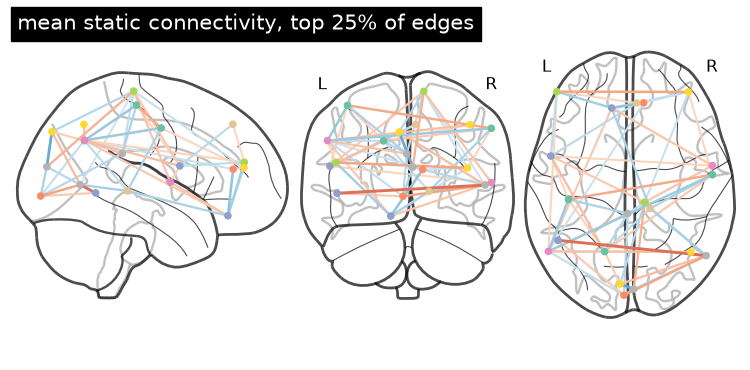
edges: 190; 75th percentile of |r|: 0.210
4. Sliding-window dynamic connectivity
res.dynamic_connectivity(s, window) correlates the factor time courses within each window of window samples, giving a (T - window + 1, K, K) array. With a 20-sample (40 s) window, the plot shows how the mean absolute connectivity of subject 0 and the correlation of each window’s pattern with the static pattern change over the movie.
[7]:
window = 20
D = res.dynamic_connectivity(0, window=window)
iu = np.triu_indices(D.shape[1], 1)
edges = D[:, iu[0], iu[1]]
static = res.connectivity(0)[iu]
mean_abs = np.abs(edges).mean(axis=1)
similarity = [np.corrcoef(e, static)[0, 1] for e in edges]
t = (np.arange(len(D)) + window / 2) * 2.0  # window centre in seconds (TR = 2 s)
fig, ax = plt.subplots(1, 2, figsize=(10, 3))
ax[0].plot(t, mean_abs)
ax[0].set(xlabel="time (s)", ylabel="mean |r|", title="subject 0, window 20 TRs")
ax[1].plot(t, similarity)
ax[1].set(xlabel="time (s)", ylabel="r with static pattern")
plt.tight_layout()
plt.show()
print("dynamic connectivity shape:", D.shape)
print(f"r with static pattern: min {min(similarity):.2f}, max {max(similarity):.2f}")
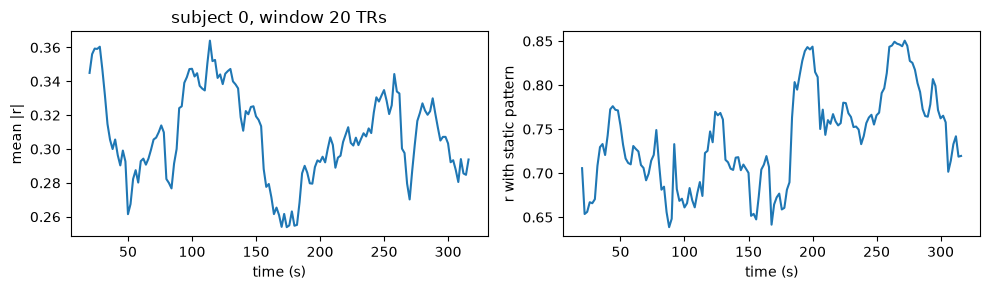
dynamic connectivity shape: (149, 20, 20)
r with static pattern: min 0.64, max 0.85
5. Inter-subject functional correlation (ISFC)
res.isfc() correlates each subject’s factor time courses with the mean of the other subjects’ time courses, symmetrizes, and averages over subjects in Fisher-z space (htfa.isfc). ISFC emphasizes activity shared across subjects and reduces contributions from signals unique to one subject. Shared motion, physiology, or preprocessing artifacts can also contribute; ISFC alone does not establish a stimulus-specific cause. The template factors make the factor index comparable across subjects.
Below, ISFC (left) next to the mean within-subject static connectivity of section 3 (right).
[8]:
fig, ax = plt.subplots(1, 2, figsize=(9, 4))
for a, M, title in ((ax[0], C, "ISFC"), (ax[1], S, "mean within-subject")):
    im = a.imshow(M, vmin=-1, vmax=1, cmap="RdBu_r")
    a.set(title=title, xlabel="factor", ylabel="factor")
fig.colorbar(im, ax=ax, shrink=0.8)
plt.show()
u = np.triu_indices_from(C, 1)
print(f"mean |ISFC| {np.abs(C[u]).mean():.3f}")
print(f"mean |within-subject r| {np.abs(S[u]).mean():.3f}")
print(f"correlation between the two edge patterns: {np.corrcoef(C[u], S[u])[0, 1]:.2f}")
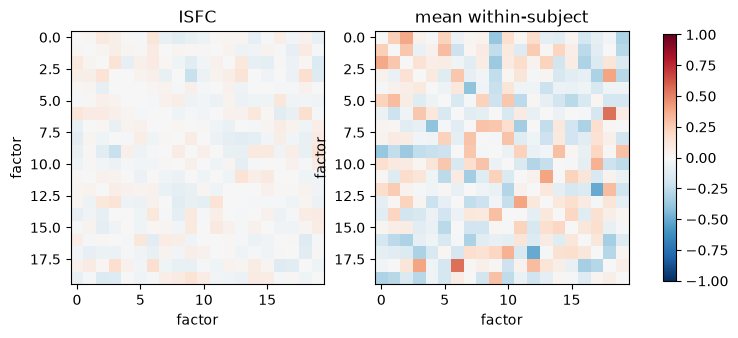
mean |ISFC| 0.048
mean |within-subject r| 0.140
correlation between the two edge patterns: 0.38
6. Animation of sliding-window ISFC
res.isfc(window=20) gives one ISFC matrix per window. The animation shows every eighth window as a matrix; it is saved as a GIF in memory and embedded.
[9]:
W = res.isfc(window=20)
frames = range(0, len(W), 8)
fig, ax = plt.subplots(figsize=(3.2, 3.0), dpi=60)
im = ax.imshow(W[0], vmin=-1, vmax=1, cmap="RdBu_r")
ax.set_xticks([])
ax.set_yticks([])


def draw(i):
    im.set_data(W[i])
    ax.set_title(f"ISFC, window starting at {2 * i} s")
    return (im,)


anim = FuncAnimation(fig, draw, frames=frames)
path = "isfc_animation.gif"
anim.save(path, writer=PillowWriter(fps=3))
plt.close(fig)
with open(path, "rb") as f:
    gif = f.read()
os.remove(path)
print("windows:", len(W), "| frames:", len(frames))
print(f"GIF size: {len(gif) / 1024:.0f} kB")
Image(data=gif, format="gif")
windows: 149 | frames: 19
GIF size: 121 kB
[9]:
<IPython.core.display.Image object>