Fitting 2D images

A 2D image is a special case of the model: the pixels are the locations, with (row, column) coordinates, and each image is one sample. htfa.fit and htfa.load read PNG, JPEG, TIFF and other common image formats (through Pillow, the images extra) and numpy arrays of shape (H, W).
This tutorial writes small image files to a temporary folder (30 x 30 pixels), loads them in each way (channels, spacing, multi-page TIFF, stack=True), and fits TFA to a single image. The final section compares small and detailed factor bases on a photograph.
This is an illustration of the coordinate-based model outside fMRI: spatial factors describe pixel patterns, and their weights reconstruct image samples or color channels. The generated blobs provide simple known spatial features; the photograph illustrates how a larger factor basis captures finer spatial detail.
[1]:
# Install htfa if it is missing (for example on Colab); other packages
# install themselves the first time they are needed.
try:
    import htfa  # noqa: F401
except ImportError:
    %pip install -q htfa
[2]:
import tempfile
import time
import warnings
from pathlib import Path

import numpy as np

import htfa
from htfa.synthetic import match_factors

plt = htfa.require("matplotlib.pyplot")
Image = htfa.require("PIL.Image")

H = W = 30
rows, cols = np.meshgrid(np.arange(H), np.arange(W), indexing="ij")
pix = np.stack([rows.ravel(), cols.ravel()], axis=1).astype(float)


def blobs(centers, widths, amps):
    """Image made of Gaussian blobs, scaled to 1-255 uint8 (no zero pixels)."""
    d2 = ((pix[:, None, :] - np.asarray(centers, float)[None]) ** 2).sum(axis=2)
    img = np.exp(-d2 / np.asarray(widths, float)) @ np.asarray(amps, float)
    img = img.reshape(H, W)
    return np.round(1 + 254 * (img - img.min()) / (img.max() - img.min())).astype(
        np.uint8
    )


centers = [(8, 9), (20, 10), (14, 22)]
widths = [30.0, 30.0, 30.0]
rng = np.random.default_rng(0)
gray = blobs(centers, widths, [1.0, 1.0, 1.0])
rgb = np.stack(
    [blobs(centers, widths, a) for a in ([1, 0, 0], [0, 1, 0], [0, 0, 1])], axis=-1
)  # one blob per color channel

tmp = tempfile.TemporaryDirectory()
root = Path(tmp.name)
Image.fromarray(gray).save(root / "gray.png")
Image.fromarray(rgb).save(root / "color.png")
Image.fromarray(rgb).save(root / "color.jpg", quality=95)
pages = [Image.fromarray(np.roll(gray, 3 * i, axis=1)) for i in range(5)]
pages[0].save(root / "pages.tif", save_all=True, append_images=pages[1:])
print(sorted(p.name for p in root.iterdir()))
['color.jpg', 'color.png', 'gray.png', 'pages.tif']
1. Loading one image
A grayscale PNG is one subject with one sample. The coordinates are (row, column) pixel indices times spacing (default 1). Subject.to_image maps a (V,) or (V, T) array back to the image grid.
[3]:
(s,) = htfa.load(str(root / "gray.png"))
print(
    "data (V, T):",
    s.data.shape,
    "| coords:",
    s.coords.shape,
    "| image_shape:",
    s.image_shape,
)
print("first coordinates:", s.coords[:2].tolist(), "| last:", s.coords[-1].tolist())
back = s.to_image(s.data[:, 0])
print("to_image round trip equals the file's pixels:", np.array_equal(back, gray))

(s2,) = htfa.load(str(root / "gray.png"), spacing=2.5)
print("with spacing=2.5, last coordinate:", s2.coords[-1].tolist())
data (V, T): (900, 1) | coords: (900, 2) | image_shape: (30, 30)
first coordinates: [[0.0, 0.0], [0.0, 1.0]] | last: [29.0, 29.0]
to_image round trip equals the file's pixels: True
with spacing=2.5, last coordinate: [72.5, 72.5]
The default mask keeps every finite pixel of a 2D image: black pixels are data here. (For NIfTI volumes the default also drops locations that are zero at every sample, as out-of-brain screening.) To drop black pixels, pass an explicit mask:
[4]:
with_black = gray.copy()
with_black[:3, :3] = 0
Image.fromarray(with_black).save(root / "black.png")
(keep,) = htfa.load(str(root / "black.png"))
(drop,) = htfa.load(str(root / "black.png"), mask=with_black > 0)
print("default mask, image with 9 black pixels: V =", keep.data.shape[0], "of", H * W)
print("mask=with_black > 0                     : V =", drop.data.shape[0])
default mask, image with 9 black pixels: V = 900 of 900
mask=with_black > 0                     : V = 891
2. Color images: channels='gray' and 'separate'
For a color image channels='gray' (default) converts to grayscale with the ITU-R 601 weights (0.299 R + 0.587 G + 0.114 B), giving one sample. channels='separate' keeps the color channels, giving one sample per channel (3 for RGB). The image below has a different blob in each channel.
[5]:
(g,) = htfa.load(str(root / "color.png"))
(sep,) = htfa.load(str(root / "color.png"), channels="separate")
print("gray    :", g.data.shape)
print("separate:", sep.data.shape)
luma = rgb.reshape(-1, 3) @ np.array([0.299, 0.587, 0.114])
print("max |gray - 601 luma of the pixels|:", np.abs(g.data[:, 0] - luma).max())
print(
    "separate channel 0 equals the red channel:",
    np.array_equal(sep.data[:, 0], rgb[..., 0].ravel()),
)

(jpg,) = htfa.load(str(root / "color.jpg"), channels="separate")
print("JPEG (lossy) vs PNG, max channel difference:", np.abs(jpg.data - sep.data).max())
gray    : (900, 1)
separate: (900, 3)
max |gray - 601 luma of the pixels|: 0.0
separate channel 0 equals the red channel: True
JPEG (lossy) vs PNG, max channel difference: 17.0
'gray' reproduces the ITU-R 601 luma of the decoded pixels, and 'separate' returns the three channels as columns. The printed JPEG–PNG difference measures loss from JPEG compression.
3. Several images: TIFF pages and stack=True
The pages of a multi-page TIFF are the samples of one subject. For a folder, each image file is its own subject by default; with stack=True all images of the same size are the samples of one subject.
[6]:
(tif,) = htfa.load(str(root / "pages.tif"))
print("multi-page TIFF:", tif.data.shape, "(V, pages)")

folder = root / "frames"
folder.mkdir()
for i in range(4):
    Image.fromarray(np.roll(gray, 4 * i, axis=0)).save(folder / f"frame-{i}.png")
print(
    "folder, default :",
    len(htfa.load(str(folder))),
    "subjects,",
    htfa.load(str(folder))[0].data.shape,
)
print(
    "folder, stack   :",
    len(htfa.load(str(folder), stack=True)),
    "subject, ",
    htfa.load(str(folder), stack=True)[0].data.shape,
)
multi-page TIFF: (900, 5) (V, pages)
folder, default : 4 subjects, (900, 1)
folder, stack   : 1 subject,  (900, 4)
4. Fitting a single image: standardize=True against the default
One image is one sample, so standardize='auto' leaves it unchanged (it z-scores over samples, and there is only one). TFA has no intercept and its ridge penalty on the weights is var(X), which for raw intensities is in squared intensity units. standardize=True z-scores the pixels across the image when T == 1.
The two fits below use the same image, K, and seed. The first uses the default; the second standardize=True. The printed centers and widths describe the fitted factors. The upper width bound is upper_ratio * 2 max(std(R))^2.
[7]:
R = s.coords
ub = 1.8 * 2 * R.std(axis=0).max() ** 2
print(f"upper width bound: {ub:.1f}")
true_c = np.array(centers, float)

fits = {}
for std in ["auto", True]:
    t0 = time.perf_counter()
    with warnings.catch_warnings():
        warnings.simplefilter("ignore")
        res = htfa.fit(str(root / "gray.png"), K=3, standardize=std, random_state=0)
    fits[std] = res
    sd = res.subjects[0].data[:, 0]
    zs = (sd - sd.mean()) / sd.std()
    rr = np.corrcoef(zs, res.reconstruct(0)[:, 0])[0, 1]
    print(f"   correlation of the reconstruction with the z-scored image: {rr:.3f}")
    m = res.model
    print(
        f"standardize={std!r:5} ({time.perf_counter() - t0:.1f} s): "
        f"stop={m.converged_reason_}, init={m.init_}"
    )
    print("   centers:", np.round(m.centers_, 1).tolist())
    print("   widths :", np.round(m.widths_, 1).tolist())
    perm = match_factors(true_c, m.centers_)
    print(
        "   distance of each estimated center to the blob center:",
        np.round(np.linalg.norm(m.centers_[perm] - true_c, axis=1), 1).tolist(),
    )
upper width bound: 269.7
   correlation of the reconstruction with the z-scored image: 0.767
standardize='auto' (0.1 s): stop=threshold, init=power
   centers: [[14.1, 13.4], [14.1, 13.4], [14.1, 13.4]]
   widths : [269.7, 269.7, 269.7]
   distance of each estimated center to the blob center: [7.5, 6.8, 8.6]
   correlation of the reconstruction with the z-scored image: 0.936
standardize=True  (0.0 s): stop=threshold, init=power
   centers: [[14.0, 21.7], [19.4, 10.2], [8.5, 9.2]]
   widths : [14.5, 16.1, 15.4]
   distance of each estimated center to the blob center: [0.5, 0.6, 0.3]
The raw-intensity fit can place several factors at a similar location with broad widths. Its ridge penalty scales with var(X), and the model has no intercept to absorb a positive image background. Standardizing the image changes both its offset and the penalty scale. Compare the centers, widths, and reconstruction correlations for the two fits. This tutorial uses standardize=True for single images.
5. The standardized fit
The reconstruction of the standardize=True fit is in the standardized space, so the image is shown z-scored too. The crosses are the estimated factor centers and the circles the blob centers used to make the image.
[8]:
res = fits[True]
sub = res.subjects[0]
z = (sub.data[:, 0] - sub.data[:, 0].mean()) / sub.data[:, 0].std()
r = np.corrcoef(z, res.reconstruct(0)[:, 0])[0, 1]
print(f"correlation of the reconstruction with the z-scored image: {r:.3f}")
print(
    "fitted width / drawing width (30):", np.round(res.model.widths_ / 30, 2).tolist()
)

fig, axes = plt.subplots(1, 3, figsize=(10, 3.4))
axes[0].imshow(sub.to_image(z), cmap="gray")
axes[0].set_title("image (z-scored)")
axes[1].imshow(res.to_image(0)[..., 0], cmap="gray")
axes[1].set_title("reconstruction")
axes[2].imshow(res.to_image(0, what="factors").sum(axis=-1), cmap="viridis")
axes[2].set_title("sum of the K factors")
for ax in axes:
    ax.plot(true_c[:, 1], true_c[:, 0], "o", mfc="none", mec="tab:red", ms=14)
    ax.plot(
        res.model.centers_[:, 1], res.model.centers_[:, 0], "x", c="tab:orange", ms=8
    )
    ax.set_xlabel("column")
axes[0].set_ylabel("row")
fig.tight_layout()
plt.show()
correlation of the reconstruction with the z-scored image: 0.936
fitted width / drawing width (30): [0.48, 0.54, 0.51]

The printed ratios compare fitted width parameters with the value 30 in the generating blobs. Overlap, min–max scaling, and z-scoring change the spatial profile of the input, so fitted widths need not recover the drawing width.
6. Separate channels, fitted
With channels='separate' the image has three samples, and standardize='auto' z-scores each pixel over the three channels. The weights then have one column per channel.
[9]:
t0 = time.perf_counter()
with warnings.catch_warnings():
    warnings.simplefilter("ignore")
    res3 = htfa.fit(str(root / "color.png"), K=3, channels="separate", random_state=0)
print(
    f"fit time: {time.perf_counter() - t0:.1f} s | stop: {res3.model.converged_reason_}"
)
print("weights shape (K, channels):", res3.weights[0].shape)
print("weights:\n", np.round(res3.weights[0], 2))
print("centers:", np.round(res3.model.centers_, 1).tolist())
fit time: 0.0 s | stop: threshold
weights shape (K, channels): (3, 3)
weights:
 [[-1.05  2.23 -1.18]
 [-1.   -1.09  2.1 ]
 [ 2.22 -1.09 -1.13]]
centers: [[21.9, 9.3], [13.9, 23.8], [6.5, 8.5]]
The weights have one column per channel. Compare each factor’s center with the channel-specific blob locations, then inspect which channel has its largest weight. Per-pixel standardization centers each pixel across channels, which also centers the fitted factor time courses up to numerical error.
7. More factors, more detail
The photograph china.jpg is bundled with scikit-learn and needs no download. Block averaging by 8 produces a 53 × 80 grayscale image. The fits use K = 5, 20, 80, 160 and 320 factors on these same 4,240 pixels: a small basis captures broad intensity patterns, while a larger basis can describe the roof, building levels and vegetation in more detail.
Factor count alone does not control resolution. The width bound is lower_ratio * 2 max(std(R))², so the default lower_ratio=0.02 excludes narrow features on a large grid. All five fits use lower_ratio=0.001, allowing factors with a Gaussian standard deviation of about 0.73 pixels. They also share threshold=1e-5, init='power' and the same random seed. One initialization keeps this example manageable; it does not guarantee the best local optimum. The largest fit is the most
expensive.
The R² here uses the image-wide mean as its baseline, since a single image has one sample and no temporal variation. It is an in-sample pixel reconstruction score, distinct from the per-voxel temporal baseline used by htfa.stats for time series.
[10]:
from sklearn.datasets import load_sample_image
from threadpoolctl import threadpool_limits

photo = load_sample_image("china.jpg")  # (427, 640, 3) uint8
b = 8
h, w = photo.shape[0] // b, photo.shape[1] // b
small = photo[: h * b, : w * b].reshape(h, b, w, b, 3).mean(axis=(1, 3))
china = small @ np.array([0.299, 0.587, 0.114])  # ITU-R 601 luma
print("image:", photo.shape, "->", china.shape)

Ks = [5, 20, 80, 160, 320]
recons, r2s = {}, {}
for k in Ks:
    t0 = time.perf_counter()
    with threadpool_limits(limits=2):
        rk = htfa.fit(
            china,
            K=k,
            standardize=True,
            init="power",
            random_state=0,
            lower_ratio=0.001,
            threshold=1e-5,
        )
    x = rk.subjects[0].data[:, 0]
    zk = (x - x.mean()) / x.std()
    resid = zk - rk.reconstruct(0)[:, 0]
    r2s[k] = 1 - (resid**2).sum() / (zk**2).sum()
    recons[k] = rk.to_image(0)[..., 0]
    print(
        f"K={k:3d} ({time.perf_counter() - t0:4.1f} s): R^2 = {r2s[k]:.3f}, "
        f"median width = {np.median(rk.model.widths_):6.1f} pixels^2, "
        f"stop = {rk.model.converged_reason_}"
    )
z_china = rk.subjects[0].to_image(zk)
image: (427, 640, 3) -> (53, 80)
K=  5 ( 0.0 s): R^2 = 0.802, median width =  301.3 pixels^2, stop = threshold
K= 20 ( 0.2 s): R^2 = 0.912, median width =   44.1 pixels^2, stop = threshold
K= 80 ( 4.5 s): R^2 = 0.957, median width =   11.0 pixels^2, stop = threshold
K=160 (14.1 s): R^2 = 0.965, median width =    7.2 pixels^2, stop = threshold
K=320 (89.6 s): R^2 = 0.973, median width =    4.5 pixels^2, stop = threshold
[11]:
fig = plt.figure(figsize=(13, 6))
gs = fig.add_gridspec(2, 4, width_ratios=[1, 1, 1, 0.9])
panels = [("image (z-scored)", z_china)]
panels += [(f"K = {k}; R² = {r2s[k]:.3f}", recons[k]) for k in Ks]
lim = np.abs(z_china).max()
for i, (title, im) in enumerate(panels):
    ax = fig.add_subplot(gs[i // 3, i % 3])
    ax.imshow(im, cmap="gray", vmin=-lim, vmax=lim)
    ax.set_title(title)
    ax.set_xticks([])
    ax.set_yticks([])
ax = fig.add_subplot(gs[:, 3])
ax.plot(Ks, [r2s[k] for k in Ks], "o-", c="tab:blue")
ax.set_xscale("log")
ax.set_xticks(Ks, [str(k) for k in Ks])
ax.minorticks_off()
ax.set_xlabel("K (number of factors)")
ax.set_ylabel("R² of the reconstruction")
ax.set_title("fit to the image")
ax.grid(alpha=0.3)
fig.tight_layout()
plt.show()
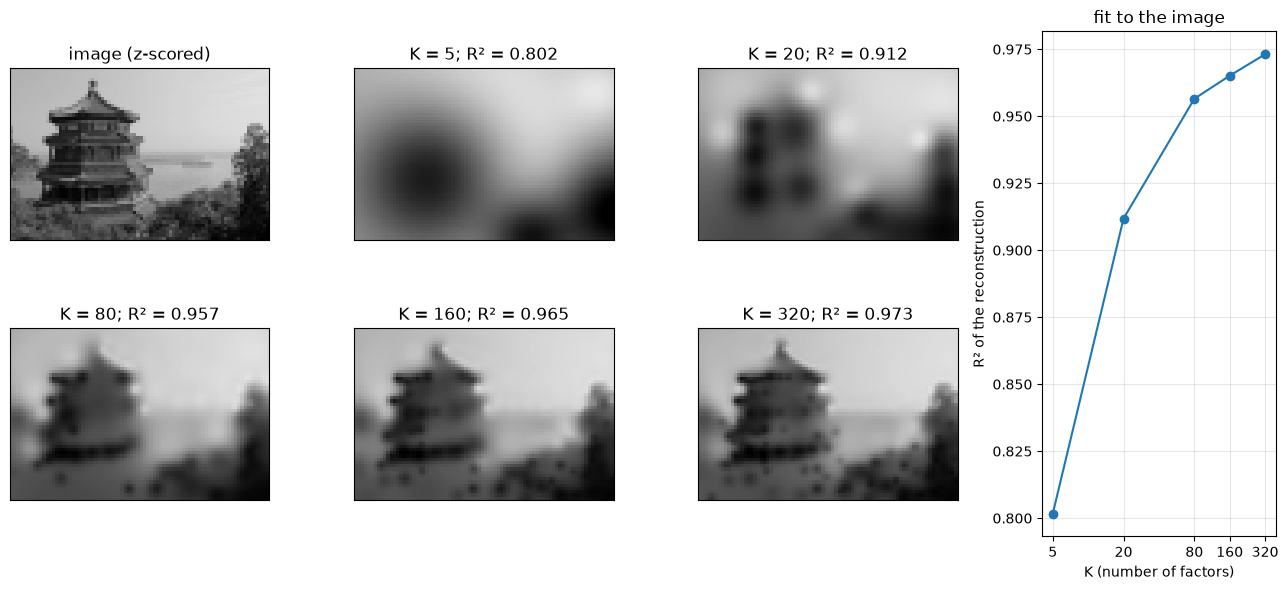
Each factor is a Gaussian bump with a center and width; its weighted contribution is summed with the others to reconstruct the image. The shared grayscale limits make detail directly comparable. Compare the roof outline, levels of the building and foreground across the reconstruction panels, alongside their R² and median widths. Even the largest basis smooths some fine texture.
These scores describe the fitted pixels, so they do not establish generalization to other images. More factors increase representational flexibility, but regularization and local optimization mean the achieved score need not improve at every K. For other images, compare factor counts and width bounds together, and use repeated starts if reconstruction quality is the priority.
[12]:
tmp.cleanup()